We research everything we recommend. When you buy through our links, we may earn a commission. As an Amazon Associate we earn from qualifying purchases.
Best DDSL2 Combo Routers: Top DSL Modem Routers 2026
Compare the best DDSL2 combo routers that combine a DSL modem and Wi-Fi router in one box, with VDSL and ADSL picks for small homes and legacy lines.
As an Amazon Associate I earn from qualifying purchases. This post may contain affiliate links at no extra cost to you.
A DSL combo router, also called a DSL modem router or gateway, combines two boxes into one. The modem side talks to the copper phone line that carries your DSL service, and the router side creates the Wi-Fi network and wired connections for the devices in your home. If you still use DSL, a good combo unit can replace a rented gateway, tidy up the shelf beside your phone socket, and give you control over your own network settings.
The best DDSL2 combo routers in this guide cover the two DSL generations most homes still meet: ADSL2 and VDSL2. That matters because the two are not interchangeable in every unit. Some combo routers handle ADSL2 only, some handle VDSL2 and ADSL2, and some handle bonded VDSL2 lines that pair two copper lines for extra speed. Buying the wrong type is the most common mistake in this category, so check your line type with your provider before you order anything.
As an Amazon Associate, we earn from qualifying purchases.
For most DSL homes, the NETGEAR Nighthawk D7000 is the strongest all-round pick, with VDSL2 and ADSL2 support, AC1900 Wi-Fi, and four Gigabit ports. Motorola MD1600 suits non-bonded VDSL2 and ADSL2 lines, the CenturyLink C4000BZ brings Wi-Fi 6 to bonded VDSL2 service, and the Actiontec GT784WNV is a simple budget option for older ADSL lines.
Our Top Picks
Every unit below is a genuine combo: a DSL modem and a Wi-Fi router in a single enclosure. No standalone routers and no standalone modems appear here. Each pick is grouped by tier so you can match the unit to your line speed and household size rather than paying for wireless speed your copper line can never deliver.
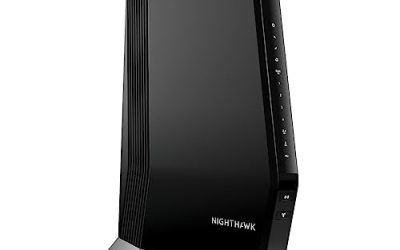
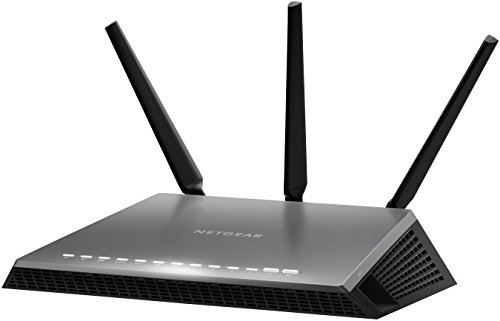
NETGEAR Nighthawk D7000 AC1900 DSL Modem Router
Top Pick
NETGEAR Nighthawk D7000 AC1900 DSL Modem Router
Wi-Fi: AC1900 dual-band, 600 Mbps on 2.4 GHz plus 1300 Mbps on 5 GHz
Modem: Built-in VDSL2 and ADSL2 modem
Wired ports: 4 Gigabit Ethernet LAN ports plus 1 Gigabit WAN port
USB: USB ports for storage sharing and printer sharing
The Nighthawk D7000 is the premium pick in this roundup and the one to choose if you want the fastest Wi-Fi in a DSL combo. It pairs a VDSL2 and ADSL2 modem with AC1900 dual-band Wi-Fi, which combines a 600 Mbps radio on the 2.4 GHz band with a 1300 Mbps radio on the 5 GHz band. That wireless headroom is far above what a DSL line delivers, which is exactly the point: the line is the bottleneck, so the Wi-Fi side should never be the reason a file transfer between two devices in your home feels slow.
Four Gigabit Ethernet ports handle wired devices such as a desktop computer, a game console, or a streaming box, and a separate Gigabit WAN port means the unit can keep working as a plain router if you later move to cable or fiber and add an external modem. USB ports support storage sharing and printer sharing across the network, and the dual-core processor helps the unit juggle several connected devices at once.
Setup runs through the NETGEAR genie interface, which walks through line detection and wireless setup, and the unit includes parental controls and a guest network for visitors. One sensible step after setup is to install the latest firmware from the maker, since older firmware versions of this model were covered by security advisories that later firmware addressed. The D7000 suits larger homes on VDSL2 or ADSL2 where several people stream, game, and work at the same time, and it is the pick to choose when you want one box that will stay useful even if your connection type changes later.
Motorola MD1600 AC1600 VDSL2 Modem Router
Runner-Up
Motorola MD1600 AC1600 VDSL2 Modem Router
Wi-Fi: AC1600 dual-band, 300 Mbps on 2.4 GHz plus 1300 Mbps on 5 GHz
Modem: Built-in VDSL2 and ADSL2 modem, line speeds up to 100 Mbps
Wired ports: 4 Gigabit Ethernet ports
Security: Built-in firewall, WPA and WPA2 security, IPv4 and IPv6, VPN support
The Motorola MD1600 is the mid-range pick and a strong match for homes on non-bonded VDSL2 or ADSL2 service from providers such as Frontier, Windstream, TDS Telecom, and Fairpoint. It combines a VDSL2 and ADSL2 modem with an AC1600 dual-band Wi-Fi router, pairing a 300 Mbps radio on the 2.4 GHz band with a 1300 Mbps radio on the 5 GHz band. Line speeds reach up to 100 Mbps depending on the service, which covers the plans most DSL households actually buy.
Four Gigabit Ethernet ports give wired devices full-speed connections, and the built-in firewall, WPA and WPA2 wireless security, IPv4 and IPv6 support, and VPN capability cover the security basics without extra hardware. Motorola backs the unit with a two-year warranty and United States-based support, which is a genuine plus in a category where many rival units are sold with little or no maker support.
Compatibility is the one thing to check carefully here. The MD1600 works only with non-bonded, non-vectoring DSL service, so it does not work with bonded VDSL, bonded ADSL, or VDSL vectoring lines, and it is never compatible with Verizon or AT and T DSL service or with any cable service. Confirm your line type with your provider first, and if the answer is non-bonded and non-vectoring, this is one of the simplest and best-supported combo routers available for that service.
CenturyLink C4000BZ WiFi 6 xDSL Modem Router
CenturyLink C4000BZ WiFi 6 xDSL Modem Router
Wi-Fi: Wi-Fi 6 dual-band, up to 3 Gbps combined, 600 Mbps plus 2400 Mbps
Modem: Built-in bonded VDSL2 and ADSL xDSL modem
Wired ports: 4 Ethernet ports
Compatibility: CenturyLink and Brightspeed DSL lines, including bonded VDSL2
The CenturyLink C4000BZ is the modern pick in this roundup and the only one here with Wi-Fi 6. Its dual-band 802.11ax wireless is rated up to 3 Gbps combined, split as 600 Mbps plus 2400 Mbps across its two bands, so a house full of phones, laptops, televisions, and smart devices has plenty of wireless room. The modem side handles bonded VDSL2, which is the line type CenturyLink uses for its faster DSL plans, and it also covers ADSL service, so it fits the widest spread of CenturyLink and Brightspeed DSL lines in this guide.
This is a gateway built for a specific job, and it does that job well. Bonded VDSL2 support means it can use two copper pairs together where the provider offers that service, and the Wi-Fi 6 radio handles many simultaneous connections better than the older Wi-Fi 5 radios in the other picks here. Four Ethernet ports cover wired devices, and the rounded white enclosure is designed to sit out in a living room rather than hide in a closet.
One point to note is availability. The C4000BZ is a provider gateway first and a retail product second, so Amazon offers for it are typically renewed units rather than brand-new retail boxes. A renewed unit should still be checked carefully on arrival, with the power adapter, Ethernet cable, and DSL cable in the box and the admin credentials on the unit label intact. For a CenturyLink or Brightspeed household that wants bonded VDSL2 and Wi-Fi 6 in one box, it is still the most capable option in this roundup.
Actiontec GT784WNV Wireless N DSL Modem Router
Actiontec GT784WNV Wireless N DSL Modem Router
Wi-Fi: 300 Mbps Wireless-N, single-band 802.11n
Modem: Built-in ADSL2 modem, speeds up to 24 Mbps downstream
The Actiontec GT784WNV is the budget pick and the simplest unit in this guide. It is certified for Verizon DSL and combines a full-rate ADSL2 modem with a four-port switch and a 300 Mbps Wireless-N router in one box. The modem supports ADSL2 with speeds up to 24 Mbps downstream, which matches the older and slower DSL plans that are still common in areas where VDSL has never arrived. If your plan tops out at that kind of speed, a faster combo router adds nothing, and this unit covers the line properly at a lower tier.
The wireless side is single-band 802.11n with two antennas, and the four wired ports are 10/100 Fast Ethernet rather than Gigabit. That sounds modest beside the other picks, but on a 24 Mbps line the wired ports are never the bottleneck, and the single-band radio is enough for a small apartment with a handful of devices. Security features include a double firewall, parental controls, and the ability to limit network access, and an auto-configuration tool aims to get a broadband connection running within minutes of plugging the unit in. The trade-off is clear: no VDSL support, no 5 GHz band, and no Gigabit ports, so it is strictly a pick for legacy ADSL lines. For a Verizon DSL household that wants to stop renting a gateway and replace a failing older unit with something simple, it does the job with the least fuss in this roundup.
How to Choose
Start with your line type, because it rules out more units than any other factor. Ask your provider whether your service is ADSL, ADSL2, VDSL2, bonded VDSL2, or vectoring VDSL2, and whether the line is bonded. A unit built for ADSL only, such as the Actiontec in this guide, cannot connect to a VDSL2 line at all. A unit built for non-bonded lines, such as the Motorola, cannot connect to a bonded or vectoring line. Only the NETGEAR and the CenturyLink units here cover bonded service, and only the CenturyLink unit is aimed squarely at bonded CenturyLink lines. Getting this answer first saves a return.
Next, match the Wi-Fi class to your household rather than to your line speed. Your DSL line may deliver only a fraction of what the Wi-Fi radio can carry, and that is normal. Wi-Fi speed matters for traffic inside your home, such as casting video to a television, moving files between devices, or running a video call while someone else streams. A small household with a few devices is fine with Wireless-N or AC1200-class Wi-Fi, while a busy household with many devices benefits from AC1600 or AC1900, and a CenturyLink household with a house full of screens benefits from Wi-Fi 6.
Count your wired devices before you buy. Four Ethernet ports is the standard across every pick in this guide, and that covers a desktop, a console, a streaming box, and one spare in most homes. If you need more wired connections, a small network switch costs little and adds ports without replacing the combo unit.
Check the modem standards printed on the box or listing. Look for VDSL2 with profile 17a support if you have VDSL2 service, and ADSL2 support if you have ADSL service. Look for PPPoE support if your provider uses PPPoE authentication, and check whether your provider needs a specific VLAN setting, since some DSL setups will not connect without it. Your provider support pages usually list the exact settings, and keeping them beside you during setup avoids a long troubleshooting call.
Think about what happens if your connection type changes. A combo router with a separate Gigabit WAN port, such as the NETGEAR D7000, can stay in service as a plain router behind a cable or fiber modem, so the purchase is not wasted if you move. A provider-specific gateway, such as the CenturyLink unit, is harder to reuse elsewhere. If a move or an upgrade is likely within a year or two, that flexibility is worth weighing.
Finally, plan for setup day. Have your provider username and password ready if your line uses PPPoE, keep the DSL cable and any filter or splitter that came with your service, and plug the combo unit into the same phone socket your old gateway used. Update the firmware once the unit is online, change the default admin password, and set a strong Wi-Fi password with WPA2 or WPA3 security. A few minutes spent on those steps at the start prevents most of the problems people blame on the hardware later.
Who Should Skip
Skip a DSL combo router entirely if your home no longer uses DSL. Cable, fiber, and fixed-wireless services do not use a DSL modem at all, so a DSL combo unit cannot connect to them, and its modem side would sit unused. In that case buy a standalone router and pair it with the modem or terminal your provider supplies.
Skip this category if your provider supplies a gateway that is already included in your plan and you are happy with it. A rented gateway is a monthly cost, so owning your own unit usually pays off over time, but if the rental is free or the provider requires its own gateway for voice service or television, replacing it may create more trouble than it saves.
Skip the budget ADSL-only picks if your line is VDSL2 or bonded, and skip non-bonded picks if your provider tells you the line is bonded or vectoring. Compatibility is a hard limit here, not a preference, and no settings change makes an incompatible modem connect.
Skip a combo unit if you already own a good standalone router that you like. In that case a standalone DSL modem in bridge mode, paired with your existing router, gives you the same connection with better wireless control. The combo route wins on simplicity and shelf space, not on raw flexibility.
Frequently Asked Questions
What is the difference between a DSL combo router and a standalone router?
A DSL combo router contains a DSL modem and a router in one enclosure, so it connects directly to the phone line and creates your Wi-Fi network. A standalone router has no modem, so it needs a separate modem or gateway in front of it before it can reach the internet.
Do I need a VDSL2 combo router or is ADSL2 enough?
It depends on your line. ADSL2 service works with an ADSL2 unit, but VDSL2 service needs a VDSL2 unit, and bonded or vectoring lines need a unit that supports those modes. Ask your provider for your line type before you buy, because the wrong modem cannot connect at all.
Can I use any DSL combo router with any provider?
No. DSL combo routers are tied to line types and sometimes to providers. Some units work only with non-bonded lines, some only with specific providers such as CenturyLink or Verizon, and none of them work with cable or fiber service. Check the compatibility notes for the unit against your provider and line type.
Will a faster Wi-Fi combo router make my DSL internet faster?
No, your internet speed is set by your DSL line and plan, and no router can raise it. A faster Wi-Fi radio improves traffic inside your home, such as streaming between devices or moving files on your local network, and it handles many connected devices more smoothly, but downloads from the internet stay at line speed.
Final Verdict
The best DDSL2 combo router for most DSL homes is the NETGEAR Nighthawk D7000, because it covers both VDSL2 and ADSL2, offers the strongest Wi-Fi in this guide, and can keep working as a plain router if your connection type changes later.
The Motorola MD1600 is the best mid-range choice for non-bonded VDSL2 and ADSL2 lines, with solid AC1600 Wi-Fi, Gigabit ports, and a two-year warranty. The CenturyLink C4000BZ is the pick for bonded CenturyLink and Brightspeed lines, bringing Wi-Fi 6 and bonded VDSL2 into one gateway, with the note that Amazon offers are typically renewed units. The Actiontec GT784WNV rounds out the guide as the budget pick for older ADSL lines, especially Verizon DSL, where its simple single-band design matches the line speed honestly.
Whichever unit you choose, confirm your line type first, then match the modem to the line and the Wi-Fi to your household. That order keeps the purchase simple and avoids the one mistake that sends a DSL combo router straight back in its box.
Product and ASIN Reference
Product
ASIN
NETGEAR Nighthawk D7000 AC1900 DSL Modem Router
B0111MRL4S
Motorola MD1600 AC1600 VDSL2 Modem Router
B077NNGNJM
CenturyLink C4000BZ WiFi 6 xDSL Modem Router
B0F1HC5RH7
Actiontec GT784WNV Wireless N DSL Modem Router
B00BLYUNH4
M
Miller the Driller Editorial Team
We compare specs, warranty terms, long-term owner feedback and street pricing before anything earns a spot. Rankings are never paid.
Affiliate disclosure. As an Amazon Associate we earn from qualifying purchases at no extra cost to you. Prices accurate as of the date shown.
Find the best golf headcovers for woods, driver, fairway wood, and hybrid clubs. Compare knit, nylon, and leather sets that protect clubheads and fit modern woods.
Compare the best Porter-Cable routers for woodworking, from the compact 450 to the 691 D-handle router and the 693LRPK two-base kit, by motor and base.
Compare the best wood spoon sets in teak and sheesham, from 7-piece and 10-piece cooking sets with spatulas and ladles for nonstick pans and daily use.
Compare four tool box sets, from a stackable three-piece tower to steel boxes on wheels, with drawer, latch and capacity checks for home and site work.
Current Windows laptops for photographers chosen by colour-accurate screens, RAM, SSD storage and card readers, with a clear note on Windows 7 support.
Compare four insect repellent sprays for beach days, from picaridin and DEET aerosols to a plant-based pump, with sizes, coverage times and beach-bag fit.



 Actiontec GT784WNV Wireless N DSL Modem Router