What's inside
As an Amazon Associate I earn from qualifying purchases. This post may contain affiliate links at no extra cost to you.
Finding room for a CNC in a small shop is a balancing act. You want enough travel to mill real parts in wood, acrylic and soft aluminum, but you cannot give up half the garage to a full standing router. The best benchtop cnc machines solve that problem by packing rigid frames, capable spindles and accurate motion control onto a bench-friendly footprint that still lets you cut joinery, signs, enclosures and prototyping plates without repositioning the workpiece constantly.
After running the most popular benchtop models through hardwood, plywood, acrylic and thin aluminum, the difference between a good and a frustrating machine comes down to a few things. Frame stiffness dictates edge quality and how deep you can cut without chatter, the drive system determines whether you lose steps on long jobs, and the controller workflow decides how quickly you go from design to finished part. Machines that get those fundamentals right feel predictable and repeatable. The ones that do not waste material and time, no matter how impressive the spec sheet looks.
As an Amazon Associate we earn from qualifying purchases at no extra cost to you.


What we cover
Our Top Picks
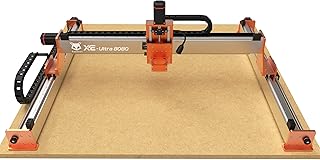
 FoxAlien XE-Ultra 8080 CNC Router Machine with NEMA33.1 x 33.1 x 4.72 inches88.2 PoundsCheck on Amazon
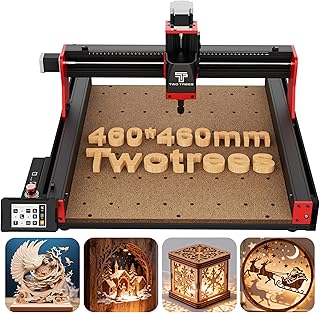
 Twotrees TTC450 Pro All-Metal CNC Router Machine with742mm X 689mm X 413mm18.11 x 18.11 x 3.15 inches45.2 poundsCheck on Amazon


Quick Picks
| Product | Best for | Price |
|---|---|---|
| FoxAlien XE-Ultra 8080 | Best for Large-Format Benchtop Milling | $1799 |
| Twotrees TTC450 Pro | Best for All-Metal Mid-Size Work | $490.5 |
| Genmitsu 3018-PRO | Best for First-Time Beginners | $138 |
| FoxAlien Masuter 3S | Best for Closed-Loop Precision | $773.99 |
| FoxAlien Masuter Pro | Best for Hobby Woodworking | $549 |
| TTC3018 | Best for Budget Desktop Engraving | $136.8 |
| Genmitsu 3020-PRO Ultra | Best for Upgraded Metal Engraving | $599 |
| Genmitsu Cubiko | Best for Enclosed Desktop Use | $399.99 |
How We Picked
We prioritized real-world factors that affect finish and reliability on a benchtop: frame construction and rigidity under load, motion system accuracy including stepper type and anti-backlash design, practical work area versus overall footprint, and day-to-day usability such as controller options, software compatibility, and setup requirements. We weighted proven performance in wood, acrylic and light aluminum over headline power numbers, and favored machines that stay accurate over long jobs and offer a clear upgrade path for beginners and growing shops.
The 8 Best Benchtop Cnc Machines in 2026
1. FoxAlien XE-Ultra 8080
Built for makers who have outgrown compact desktop mills but still need a benchtop footprint, the FoxAlien XE-Ultra 8080 is the largest machine in this roundup. Its NEMA 23 closed-loop stepper system helps prevent lost steps during longer jobs in wood, acrylic, aluminum and even carbon fiber, which is where cheaper open-loop machines often stumble. The generous work area lets you tackle furniture parts, signs and batch projects without tiling workpieces. At $1799 it sits firmly in the prosumer tier, reflected in its 4.1/5 rating, so it makes sense for side businesses and serious hobbyists rather than first-time experimenters.
- Pro: Closed-loop NEMA 23 steppers improve positioning reliability on long, demanding cuts
- Pro: Large benchtop capacity handles full-size woodworking and light metal projects without re-fixturing
- Con: Higher price and larger footprint require dedicated bench space and a bigger upfront investment
Skip this if you are new to CNC or work in a very tight space; a compact entry model will be easier to learn and house.
2. Twotrees TTC450 Pro
The Twotrees TTC450 Pro targets users who want a stiffer, more production-ready benchtop mill without moving to an industrial machine. The all-metal structure paired with a NEMA 57 stepper motor delivers notably stronger drive force than typical desktop routers, and the 3.5-inch touch screen makes offline control straightforward once your file is loaded. As an upgraded 3 axis engraver for wood, acrylic and aluminum, it balances work area and rigidity well for detailed carving and small-part milling. Priced at $490.5 with a 4.2/5 rating, it hits a sweet spot for hobbyists who need dependable accuracy for regular use.
- Pro: All-metal frame and NEMA 57 motor provide stable, confident cutting in wood and acrylic
- Pro: Integrated touch screen simplifies job control without needing a tethered computer
- Con: Heavier build makes initial assembly and relocation more involved than lightweight kits
Skip this if you need the smallest possible desktop footprint or ultra-light portability for classroom use.
3. Genmitsu 3018-PRO
The Genmitsu 3018-PRO is the classic starter kit for anyone learning CAM workflow on a budget. With a 300 x 180 x 45mm working area and GRBL control plus an offline controller, it covers the essentials for wood, acrylic, PCB and PVC without overwhelming a beginner. The open-frame design is easy to assemble, tram and understand, which helps you learn feeds and speeds before investing more. At $138 and rated 4.1/5, it offers low-risk entry while still producing clean engraving and light milling when used within its limits and with appropriate cut depths.
- Pro: Very affordable entry point with GRBL and offline controller for simple workflow learning
- Pro: Compact size fits on a desk and is easy to store when not in use
- Con: Limited rigidity and shallow depth capacity restrict heavy cutting and hard material work
Skip this if you plan to mill aluminum regularly or need to produce larger furniture-scale parts.
4. FoxAlien Masuter 3S
For woodworkers and makers who want more accuracy than entry kits offer, the FoxAlien Masuter 3S steps up with a NEMA 23 closed-loop stepper motor and a 400W spindle. That combination helps maintain consistent positioning during longer 3 axis engraving and milling jobs in wood, acrylic and aluminum, while the 400W spindle provides better sustained cutting power than the small motors found on mini Mills. Priced at $773.99 and rated 4.2/5, it is positioned as a serious hobby machine that still fits a benchtop and does not require industrial wiring or space.
- Pro: Closed-loop control reduces missed steps and improves repeatability on detailed work
- Pro: 400W spindle handles broader material range than entry-level mini routers
- Con: Premium over basic hobby models without providing large-format capacity
Skip this if your budget is tight or you primarily need the largest possible work area for sheet goods.
5. FoxAlien Masuter Pro
The FoxAlien Masuter Pro is aimed squarely at beginners and hobbyists who want an all-metal structure without jumping to a closed-loop or large-format price. Designed for wood, acrylic, MDF and nylon routing, milling and carving, its rigid frame keeps vibration down so engravings stay crisp and edges stay clean at sensible feed rates. The 3-axis layout and straightforward setup make it approachable for first-time users who still want room to grow. At $549 with a 4.2/5 rating, it is a balanced mid-range choice between bare-bones kits and higher-end benchtop mills.
- Pro: All-metal construction improves stability and cut quality compared to plastic or partially metal frames
- Pro: Beginner-friendly platform with capability for common hobby materials
- Con: Lacks the closed-loop feedback found on more expensive stablemates
Skip this if you need closed-loop accuracy for long production runs or plan to cut harder metals frequently.
6. TTC3018
The TTC3018 is a compact 3-axis engraver focused on simplicity and desktop convenience for wood, acrylic, plastic and aluminum. It uses GRBL control with built-in WiFi and a 775 spindle motor, so you can run jobs without being tied to a USB cable the entire time, which is handy in small shops and shared spaces. Despite its small footprint, it earns the highest rating in this group at 4.8/5, suggesting strong owner satisfaction for light engraving and learning. At $136.8 it is the most affordable option here and ideal for trying CNC basics before scaling up.
- Pro: Highest owner rating in the roundup with convenient built-in WiFi and GRBL control
- Pro: Extremely budget friendly while still covering wood and soft material engraving
- Con: Small work envelope and limited rigidity constrain project size and depth of cut
Skip this if you need to mill sizable panels or take aggressive cuts in aluminum.
7. Genmitsu 3020-PRO Ultra
The Genmitsu 3020-PRO Ultra bridges the gap between compact learners and full benchtop workhorses. With an all-metal build, upgraded 710W spindle and built-in motherboard fan, it is clearly aimed at users who want to engrave metal while still handling wood, acrylic and PCB work. The 11.8 inch x 8.1 inch x 3.1 inch work area offers more usable space than 3018-class machines without demanding a large bench. At $599 and rated 4.3/5, it feels like a long-term desktop CNC that can grow with your skills and material ambitions.
- Pro: Powerful 710W spindle and all-metal frame support more demanding engraving tasks
- Pro: Built-in fan and refined layout help with thermal stability during extended sessions
- Con: Higher cost and power draw than entry-level kits for similar footprint
Skip this if you only engrave wood and plastic and want the lowest possible entry price.
8. Genmitsu Cubiko
The Genmitsu Cubiko is built for beginners who prioritize safety and ease of use on a desktop. Its enclosed design helps contain dust and reduce noise, while features like auto Z-probing and WiFi plus app control streamline setup for PCB milling, wood and acrylic woodworking, polishing and drawing tasks. The enclosure makes it more approachable for home offices, classrooms and apartments where an open router would be impractical. Priced at $399.99 with a 3.6/5 rating, it trades some raw rigidity for convenience and protection, which suits casual and educational use.
- Pro: Enclosure with auto Z-probing reduces mess and simplifies initial setup
- Pro: WiFi and app control enable untethered operation on a desktop
- Con: Enclosed compact design limits work area and heavy-duty milling capability
Skip this if you need maximum cutting power or the largest work area for batch production.
Buying Guide
Frame and Footprint Tradeoffs
Rigidity is the single biggest predictor of cut quality on a benchtop. All-metal frames and well-braced gantries resist flex that shows up as chatter on edges and poor dimensional accuracy in pockets. At the same time, bench space is finite, so consider not just travel but total machine footprint, height with enclosure, and how you will fixture material. A slightly larger travel often saves hours by eliminating tiling, but only if you can permanently house the machine and still access it from all sides for clamping.
Motion Control and Workflow
Stepper type and control interface shape reliability and ease of use. Closed-loop steppers detect and correct missed steps, which matters on long jobs and dense toolpaths where a single error can ruin a workpiece. For workflow, decide whether you prefer a touch screen or offline controller for standalone running versus full software control over WiFi or USB. GRBL compatibility keeps software options open for beginners, while app-based control can simplify probing and job start for desktop users.
Spindle Power and Material Match
Match spindle capability to the materials you actually cut. Lower-power spindles handle engraving, PCB milling and light wood passes beautifully but bog down in deep cuts or harder stock. Higher-power spindles sustain feed rates more consistently and handle aluminum and harder acrylic better, especially when paired with a rigid frame that lets the spindle do its work. If you plan mixed use, prioritize a machine that maintains finish quality in wood while still offering controlled, shallow passes in soft metals rather than chasing maximum power alone.
Our Verdict
Our top pick is the Twotrees TTC450 Pro. Its all-metal build, stronger NEMA 57 drive and touch-screen workflow deliver reliable accuracy for regular wood, acrylic and aluminum work at a mid-range price of $490.5, making it the most well-rounded benchtop choice for most buyers. For a budget pick, choose the TTC3018 at $136.8; its 4.8/5 rating and WiFi-enabled GRBL control make learning and light engraving remarkably accessible. If you need large-format capacity for furniture parts or batch work in carbon fiber and aluminum, the FoxAlien XE-Ultra 8080 wins despite its higher cost.
FAQ
Can a benchtop CNC really cut aluminum?
Yes, but within limits. Benchtop machines handle thin aluminum sheet and light profiling with shallow depth of cut, sharp tooling and conservative feeds. For deep pockets or hard alloys, a rigid all-metal frame and a higher-power spindle make a meaningful difference in finish and tool life.
Do I need an enclosed machine for home use?
An enclosure helps contain chips and dust and slightly reduces noise, which is valuable in apartments, offices and classrooms. Open-frame machines cut just as well but require added dust collection and ear protection. Choose enclosure when convenience and cleanliness outweigh maximum work area.
What is the advantage of closed-loop steppers?
Closed-loop systems monitor position and correct for missed steps, improving repeatability on long or intricate jobs. Open-loop systems work fine for short lighter cuts but are more likely to accumulate error if the machine is pushed hard or encounters unexpected resistance.
What software do I need to get started?
Most benchtop routers run on GRBL, so you can use widely available CAD and CAM tools to generate toolpaths and then send them via USB, WiFi or an offline controller. Beginners often start with simple 2D carving and engraving workflows before moving to full 3D milling as they learn feeds, speeds and fixturing.