Key takeaways
- Learn whether a 20V rechargeable drill battery can be repaired, which faults you can check safely at home, and when replacing the pack is the safer choice.
What's inside
As an Amazon Associate I earn from qualifying purchases. This post may contain affiliate links at no extra cost to you.
Yes, some 20V rechargeable drill battery problems can be fixed, but only a narrow set of them belong on a home workbench. Dirty contacts, a charger that is not working, a pack that needs the reset step described in its manual, or a latch that no longer seats properly can all look like a dead battery while the cells inside are still usable. Those checks are worth doing first, because they are external, reversible, and covered by normal owner maintenance.
The harder faults are different. A worn-out cell, a failed protection board, or heat damage inside a sealed lithium pack is not a simple home repair, even when a replacement cell looks similar. This guide explains how to tell the two groups apart, which checks you can do safely, what cell replacement actually involves, and when a new pack is the sensible answer instead of a repair attempt.
As an Amazon Associate we earn from qualifying purchases.
What we cover
What Repair Really Means for a Sealed Pack
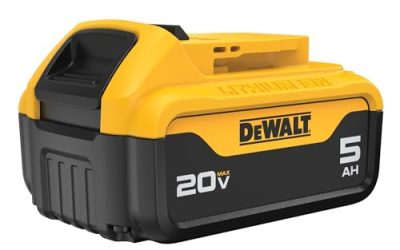
A modern 20V drill battery is not a single battery. It is a sealed pack containing several lithium-ion cells joined together, a protection and monitoring board often called a BMS, a temperature sensor, metal contacts, and a molded housing with a latch. The board watches the cells as a group, stops charging or discharging when something falls outside safe limits, and on many platforms it also communicates with the charger and the tool. When people say a pack has died, any one of those parts could be responsible, and the symptoms often overlap.
That construction shapes what repair means in practice. Manufacturers design these packs to be serviced as a complete unit, not opened and rebuilt by owners. The housing is usually clipped, welded, or fastened in a way that resists opening, and disturbing it can break seals, damage the board, or leave the pack unable to close securely again. Opening a pack can also end warranty coverage, because the maker can no longer be sure the cells, wiring, and protection parts are in their original condition.
So the honest answer has two parts. External faults and charging faults can often be corrected without opening anything, and those fixes are legitimate repairs. Internal faults can sometimes be corrected by a qualified repairer with the right equipment, but for most owners the realistic choices are a warranty claim, a professional assessment where the brand offers one, or a replacement pack. Treating those as the same kind of job is where trouble starts.
Start With Diagnosis, Not Disassembly
Good diagnosis begins outside the pack. Note exactly what happens: does the charger light stay off, blink an error pattern, or show a full charge that disappears under load? Does the drill run briefly and stop, run weakly, or not start at all? Does the same pack behave the same way in another tool, and does a known working pack run your drill normally? Swapping packs and chargers, where you already have compatible ones, separates a battery fault from a charger fault and from a tool fault faster than any guesswork.
Look closely at the contacts on the pack, the charger, and the tool. Dust, dried debris, light corrosion, and bent or recessed terminals can interrupt charging or cut power when the drill vibrates. Check the latch as well: a pack that does not click fully home may lose contact mid-job and mimic an electrical failure. Inspect the housing for cracks, melted areas, a distorted shape, or a chemical smell. Those are not cleaning jobs. They are stop signs, covered in the safety section below.
Finally, consider the pack’s history. A battery that faded gradually over years of regular use is probably showing normal cell wear. A pack that failed suddenly after a drop, after being left in a hot vehicle, or after exposure to water points toward physical or board damage. A pack that sat fully discharged in storage for a long period may have fallen below the level at which the charger will accept it. The history does not prove the cause, but it tells you which explanation to test first and whether repair is plausible at all.
What You Can Safely Do Yourself
The owner-level jobs share one rule: none of them requires opening the pack. Start by cleaning the contacts. Remove the pack from the tool and unplug the charger, then wipe the metal terminals with a dry cloth. For stubborn grime, follow the method in your brand’s manual, keep any cleaning material away from the inside of the terminals, and let everything dry completely before charging. Never scrape contacts with a tool that could short the terminals together or remove the plating that protects them.
Next, check the charging setup itself. Confirm the charger is the correct one for the platform and voltage class, that its own contacts are clean, and that the pack is seated fully. Try a different outlet if the charger shows no signs of life. Charge at ordinary room conditions rather than in a freezing garage or a hot shed, because chargers can refuse or pause charging when the pack is too cold or too warm. If the manual describes leaving the pack on the charger to reset an error state, or removing and reseating it, follow that exact sequence rather than improvising one.
If those steps restore normal charging and the drill then runs properly under load, the fault was external and the job is done. If the pack charges but fades within minutes, or one charger error returns every time, the problem is almost certainly inside the sealed unit. At that point, further home work stops being maintenance and starts being disassembly, which is a different decision with different risks.
What Replacing Cells Actually Involves
Inside the pack, the cells are connected in a series and parallel arrangement that produces the platform voltage and capacity. Rebuilding means opening the housing, removing the joined cells, and fitting replacements that match the originals in chemistry, size, capacity, and discharge capability. Cells in a shared pack age and work together, so repairers generally treat the set as a set: fitting one fresh cell among worn ones leaves the group unbalanced, with the weakest cell still limiting runtime and the protection board still likely to intervene.
The joining method matters as much as the cell choice. Pack cells are normally joined with nickel strips attached by spot welding, which applies a very brief, localized pulse of heat. A spot welder, suitable strips, insulation materials, and a way to test the finished pack are the basic equipment for this work. Direct soldering onto a cell is a different matter: sustained heat at the cell terminal can damage internal seals and safety features, which is why manufacturers and experienced repairers do not treat a household soldering iron as a substitute for the proper equipment.
Skill is the other requirement. The work involves live cells that cannot be switched off, tight spacing where a slipped tool can short terminals, a protection board that must be reconnected correctly, and polarity that must be right the first time. A rebuilt pack also needs its housing to close and latch exactly as before, because a strained case changes how the pack sits in the tool and charger. Anyone missing the equipment, the testing gear, or the experience should read that as the answer: this is specialist work, not a weekend experiment.
Lithium Safety Rules That Come First
Lithium-ion cells store a lot of energy in a small space, and the safety rules follow from that. Never puncture, crush, bend, or drill into a cell or a pack, and never open a pack that is swollen, hot, hissing, smoking, leaking, or giving off a strong sweet or chemical smell. A swollen pack has already failed internally. Stop using it, do not charge it, do not press it back into shape, and keep it away from flammable materials while you arrange proper disposal through a local battery recycling or hazardous waste route.
Charge and store packs the way the manual directs: on a non-flammable surface, away from heat sources, and never left charging in a place where a problem would go unnoticed for a long time. Do not charge a pack that was dropped hard, cracked, or soaked until the brand’s guidance says it is acceptable, and do not use a charger from a different platform even if the pack seems to fit. Physical fit is not electrical compatibility, and the protection systems may not communicate.
If a pack overheats during use, remove it if that can be done safely, set it down away from combustible material, and let it cool on its own. Do not put a hot or damaged pack in a sealed container, in a vehicle in the sun, or in household trash. Damaged lithium batteries belong in the dedicated collection stream your area provides, and local rules decide the exact drop-off point, so check those rules rather than assuming curbside collection will take it.
How to Choose
Judge the Symptoms Before Anything Else
Sort the fault by where it shows up. A pack that will not charge at all, shows a charger error, or works in one tool but not another points first to contacts, the charger, or the latch. A pack that charges fully but delivers very short runtime points to cell wear. A pack that cuts out under heavy load but recovers after resting suggests the protection board is stepping in, which can reflect a weak cell group rather than a board failure itself. Matching the symptom to the likely layer keeps you from opening a pack whose real problem sits in the charger.
Rule Out the Charger and the Tool
Before judging the battery, remove the other suspects. Clean the charger contacts, confirm the charger suits the platform, and let a cold or hot pack return to room conditions before charging. If a second compatible pack is available, its behavior in your drill tells you whether the tool is part of the problem, and your suspect pack in a second tool tells you whether the fault travels with the battery. A fault that stays with one component is a finding. A fault that appears everywhere usually means the shared item, often the charger, deserves the closest look.
Weigh the Pack’s Age and History
A gradual loss of runtime in an older, heavily used pack is the normal end of cell life, and no external fix restores worn cells. Sudden failure tells a different story: a drop can crack internal connections, water can reach the board, and long storage in a discharged state can leave a pack the charger refuses. Note any swelling, heat, odor, or case damage at this stage, because those findings end the repair discussion entirely. An honest history check often decides the outcome before any tool comes out of the drawer.
Compare Repair Effort Against Replacement
Set the likely repair path against a straightforward replacement. External cleaning and charger checks cost little time and are always worth doing. Internal work means specialist equipment, matched cells, testing, and the loss of a sealed, warranted unit, with no guarantee the board or housing survives the process. Also check warranty status first, since a covered pack should go back through the brand rather than be opened at home. When the fault is internal, the pack is old, or coverage has expired, replacement is usually the rational choice rather than the wasteful one.
Which One Fits Your Situation
Your Pack Will Not Charge at All
Start with the charger, the outlet, and the contacts, in that order. Clean the terminals, seat the pack firmly, and let it reach room temperature before trying again. Follow any reset sequence in the manual exactly. If a different compatible charger also refuses the pack, the fault is likely internal, and replacement or a warranty claim is the realistic next step rather than opening the housing.
Runtime Has Slowly Shrunk Over Time
Gradual fading is the signature of cell wear, and it is not something cleaning or resetting can reverse. Confirm it by noting how the pack behaves under a familiar job compared with its earlier performance. If the pack is otherwise undamaged, plan on replacing it and recycling the old one. A specialist rebuild is possible in principle, but for a worn consumer pack it rarely makes sense.
The Pack Failed Right After a Drop
Sudden failure after impact suggests cracked connections, a damaged board, or a hurt cell, none of which you can assess from outside. Inspect the case carefully and stop if there is swelling, heat, odor, or distortion. Do not charge a pack you suspect is internally damaged. Use the warranty route if it applies; otherwise replace the pack and dispose of the damaged one properly.
The Pack Is Swollen, Hot, or Damaged
There is no repair decision to make here. Stop using the pack, do not charge it, and do not try to open, puncture, or reshape it. Keep it away from flammable materials and take it to a battery recycling or hazardous waste collection point that accepts damaged lithium batteries. Replacement is the only outcome, and safe disposal is the immediate priority.
Common Mistakes
- Opening a sealed pack to look inside before checking the charger, contacts, and latch, which turns a possible external fix into a warranty and safety problem.
- Trying to solder directly onto lithium cells with a household iron instead of recognizing that pack cells are joined by spot welding with dedicated equipment.
- Replacing only one worn cell in an aged set, leaving mismatched cells that unbalance the pack and keep the protection board cutting power early.
- Charging a swollen, cracked, or overheated pack to see if it recovers, instead of stopping use and sending it to proper battery disposal.
- Assuming a pack that physically fits another brand’s charger is compatible, when its protection and charging communication may not match at all.
Frequently Asked Questions
Can a dead 20V drill battery be brought back to life?
Sometimes, but it depends on why it died. Packs that fail because of dirty contacts, a charger problem, or an error state the manual covers can work again after basic checks. A pack whose cells have worn out or been damaged cannot be revived by external tricks, and forcing charge into a failed lithium pack is unsafe. Diagnose first, then decide.
Is it safe to replace the cells inside the pack myself?
Cell replacement is specialist work. It calls for matched cells, a spot welder rather than a soldering iron, insulation materials, testing equipment, and experience working around cells that are always live. A mistake can short the pack, damage the protection board, or create a fire risk later. Most owners are better served by a warranty claim or a new pack.
Why does my battery charge fully but die quickly?
That pattern usually means the cells can accept a charge but can no longer deliver their original capacity, which is normal wear over time. It can also reflect one weak cell group causing the protection board to stop discharge early. Either way, the cause is inside the sealed pack, so cleaning and charger checks will not restore the lost runtime.
Does opening the pack affect the warranty?
In most cases, yes. Tool batteries are sold as sealed units, and opening the housing, cutting welded connections, or changing cells gives the manufacturer clear grounds to treat the pack as modified and outside its original condition. If your pack is still within its warranty period, contact the brand before doing anything beyond the external checks described in the manual.
The Bottom Line
A 20V drill battery can be repaired when the fault lives outside the sealed housing: contacts, charging, seating, or a documented reset. When the fault lives inside, in worn or damaged cells or the protection board, the safe and realistic options are a warranty claim, a qualified repairer where one is offered, or a replacement pack. Work through the external checks in order, respect every swelling, heat, or damage warning, and let that evidence make the decision for you.
Related guides
More from Amazon
Programs that pair well with the guide above. Offers and eligibility are set by Amazon and may change.
A free business account with business pricing and bulk-buying tools for work, shop or home office.
Create a business accountFree shipping on eligible items, Prime Video and more. Eligible new members can start with a free trial.
Start a Prime free trialAudiobooks and podcasts to listen to on the go. Eligible new members can start with a free trial.
Try Audible freeAd-free music streaming. Eligible new subscribers can start with a free trial.
Try Music Unlimited freeAs an Amazon Associate we earn from qualifying purchases.