We research everything we recommend. When you buy through our links, we may earn a commission. As an Amazon Associate we earn from qualifying purchases.
5 Best Combo Routers Modems for Cable (November 2026)
Five cable modem router combos compared, from a multi-gig WiFi 6 gateway to a budget DOCSIS 3.0 pick. Find the right match for your plan and home.
As an Amazon Associate I earn from qualifying purchases. This post may contain affiliate links at no extra cost to you.
A modem router combo replaces two boxes with one: the cable modem that talks to your provider and the WiFi router that spreads the signal around your home. The real decision is not which brand looks best on a shelf, it is how much speed your plan actually delivers and how much of it your household uses. A multi-gigabit gateway is wasted on an 800 Mbps plan, while a DOCSIS 3.0 box caps a gigabit connection before the signal ever reaches your laptop. Match the modem to the plan first, then worry about WiFi range and ports.
This guide is for cable households that rent a gateway from their provider, for gigabit subscribers who want one box instead of two, and for smaller homes on mid-tier plans that need a reliable combo without paying for speed they cannot use. Every unit below is a modem and router in a single device, chosen from the name and specifications shown on its Amazon product page.
As an Amazon Associate we earn from qualifying purchases.
Product
Best for
Key spec from title
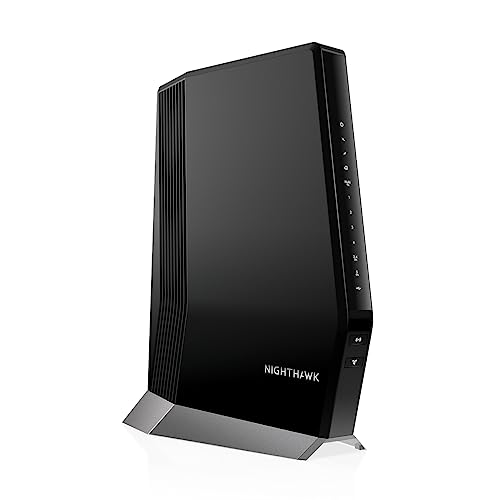
NETGEAR Nighthawk CAX80
Multi-gig cable plans
AX6000 WiFi 6, DOCSIS 3.1, plans up to 6 Gbps
NETGEAR Nighthawk CAX30
Gigabit plans at home
AX2700 WiFi 6, DOCSIS 3.1, plans up to 1 Gbps
ARRIS SURFboard G34
WiFi 6 on a 1 Gbps plan
AX3000 WiFi 6, DOCSIS 3.1, 1 Gbps max
Motorola MG7700
Mid-tier plans on a budget
AC1900 WiFi, DOCSIS 3.0, plans up to 800 Mbps
ARRIS SURFboard SBG8300
Wired gigabit homes
AC2350 WiFi, DOCSIS 3.1, 1 Gbps max
How to Choose
Match the modem to your plan speed
Start with the speed on your cable bill, because the modem sets the ceiling for everything downstream of it. DOCSIS 3.1 is the current cable standard and handles gigabit and multi-gigabit plans, while DOCSIS 3.0 tops out lower and suits plans up to 800 Mbps. A gigabit plan paired with a DOCSIS 3.0 box never reaches full speed, no matter how good the WiFi is. Check the listing for the plan ceiling it states, not the theoretical modem limit, and remember that a single Gigabit Ethernet port caps wired speed near 940 Mbps even on a faster plan.
Weigh WiFi generation against coverage
WiFi 6 brings more capacity for crowded homes, so a house full of phones, laptops, and streaming sticks benefits from AX2700, AX3000, or AX6000 radios. WiFi 5 units such as AC1900 and AC2350 still serve smaller homes well, especially where most traffic runs over Ethernet. Coverage figures on listings assume open layouts, so treat a 2,500 square foot claim as a best case and expect walls and floors to shrink it. Count the devices that connect at once, including smart TVs and speakers, and pick a unit rated for at least that many.
Check the wired ports before you buy
Wireless gets the attention, but the back panel decides how well a combo serves desktops, consoles, and network storage. Four Gigabit Ethernet ports cover most homes, and a 2.5 Gigabit Multi-Gig port matters only if your plan exceeds a gigabit or you run a fast local network. Link aggregation bonds two Gigabit ports into one faster wired link for a compatible device, which is useful for a media server or workstation. A USB 3.0 port lets you share a drive or printer across the network, while units without one leave that job to another device.
Confirm ISP approval and the limits of a combo
A combo only works if your provider approves the exact model, so check the approval list for Xfinity, Spectrum, or Cox before ordering and confirm the model number, not just the brand. Every unit here is cable only, which means none of them works with fiber, DSL, or satellite service, and none carries bundled voice service from a cable provider. Activation usually means registering the modem’s MAC address with your provider, a step that takes minutes but cannot be skipped. If you move to a provider that does not approve the model, the combo becomes a spare.
The 5 Best Options
1. NETGEAR Nighthawk CAX80
Top Pick
1. NETGEAR Nighthawk CAX80
Best for: Multi-gigabit cable households that want the fastest WiFi 6 combo in one box.
DOCSIS 3.1 cable modem with 32×8 channel bonding
AX6000 WiFi 6, up to 6 Gbps wireless
Cable plans up to 6 Gbps; modem supports up to 10 Gbps
1 x 2.5 Gbps Multi-Gig port plus 4 Gigabit Ethernet ports
The CAX80 is the strongest combo in this lineup, pairing a DOCSIS 3.1 modem with AX6000 WiFi 6 for cable plans up to 6 Gbps. It carries a 2.5 Gigabit Multi-Gig port alongside four Gigabit Ethernet ports, so a multi-gigabit plan can actually reach wired devices at full speed, and two ports can be bonded into one faster link. The listing rates coverage at 2,500 square feet for up to 30 devices, which fits large homes with many connected gadgets. It is certified for Xfinity, Spectrum, and Cox, and it replaces both the rented modem and the rented router in one box.
Watch out for: Cable only, so it cannot run on fiber, DSL, or satellite service, and it does not carry bundled voice. Its full speed needs a multi-gigabit plan.
2. NETGEAR Nighthawk CAX30
Runner-Up
2. NETGEAR Nighthawk CAX30
Best for: Gigabit households that want WiFi 6 and solid wired options without multi-gig hardware.
The CAX30 is the mainstream pick, combining a DOCSIS 3.1 modem with AX2700 WiFi 6 for cable plans up to 1 Gbps. Its four Gigabit Ethernet ports support link aggregation, so a compatible device can bond two ports for a faster wired connection, and the single USB 3.0 port shares a drive or printer across the network. Coverage reaches 2,000 square feet for up to 25 devices, which suits most family homes. It keeps the Nighthawk feature set of the CAX80 while dropping the multi-gig port that only faster plans can use.
Watch out for: No 2.5 Gigabit port, so wired speed tops out at a single Gigabit Ethernet connection. It also does not carry bundled voice service.
3. ARRIS SURFboard G34
3. ARRIS SURFboard G34
Best for: Gigabit cable plans that need WiFi 6 and a longer warranty.
The G34 is ARRIS at its most straightforward: a DOCSIS 3.1 modem with AX3000 WiFi 6, built for cable plans up to 1 Gbps. Four Gigabit Ethernet ports handle wired desktops, consoles, and streaming players, and the unit carries a two-year warranty, a step up from the one-year cover on many rivals. Approval covers Comcast Xfinity, Cox, and Spectrum, the three largest cable providers in the United States. For a gigabit household that wants WiFi 6 without paying for multi-gigabit hardware, it is the cleanest fit in this lineup.
Watch out for: No USB port for shared storage, and no 2.5 Gigabit port. WiFi 6 only helps devices that support the newer standard.
4. Motorola MG7700
4. Motorola MG7700
Best for: Cable plans up to 800 Mbps in homes that mainly use WiFi.
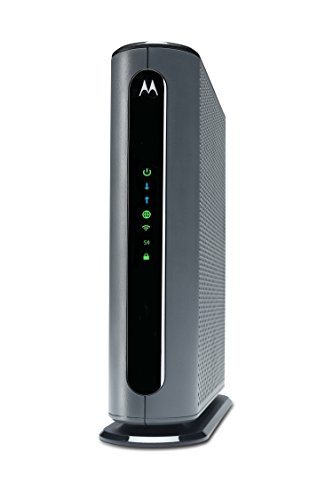
The MG7700 is the budget pick, a DOCSIS 3.0 combo with AC1900 dual-band WiFi for cable plans up to 800 Mbps. Its 24×8 channel bonding and Power Boost amplifiers suit homes where the plan sits below gigabit and most devices connect over WiFi rather than Ethernet. Approval covers Comcast Xfinity, Cox, and Spectrum, so activation follows the same process as the newer models here. It is the oldest design in this lineup, and that shows in its WiFi generation, but for a mid-tier plan it delivers the core job at a lower cost than any DOCSIS 3.1 unit.
Watch out for: DOCSIS 3.0 and WiFi 5 make it a poor match for gigabit plans. Confirm the listing’s support terms, since this is an older design.
5. ARRIS SURFboard SBG8300
The SBG8300 pairs a DOCSIS 3.1 modem with AC2350 dual-band WiFi 5 for cable plans up to 1 Gbps. Four Gigabit Ethernet ports give wired devices a direct connection, and the modem bonds 32 downstream and 8 upstream channels with 2×2 OFDM for gigabit throughput. Approval covers Comcast Xfinity, Cox, and Spectrum, and the unit carries a two-year warranty. WiFi 5 is a generation behind the WiFi 6 models here, so this pick makes sense for homes that wire most devices and treat wireless as a secondary connection.
Specs
DOCSIS 3.1 cable modem with 32×8 channel bonding and 2×2 OFDM channels
AC2350 dual-band WiFi 5
1 Gbps max internet speed
4 Gigabit Ethernet ports
Approved for Comcast Xfinity, Cox, and Spectrum
No USB port and no cable voice support
Best for: Gigabit homes that wire most devices and do not need WiFi 6.
Watch out for: WiFi 5, not WiFi 6, and no USB port or bundled voice support. The model is an older design, so confirm the listing’s support and warranty terms before ordering.
Which One Fits Your Situation
You rent a gateway from your provider
Any of the five units ends the monthly rental, but the right one depends on your plan. On a gigabit plan, the CAX30 or the G34 keeps the monthly charge gone without paying for multi-gigabit hardware. On a plan up to 800 Mbps, the MG7700 does the same job for less. Check your provider’s approval list for the exact model, then return the rented gateway once the new unit is active.
You have a multi-gigabit plan
Only the CAX80 fits here. Its DOCSIS 3.1 modem and AX6000 WiFi 6 handle cable plans up to 6 Gbps, and its 2.5 Gigabit Multi-Gig port lets a wired device use speeds above a gigabit. The other four units cap wired throughput at a single Gigabit Ethernet port, so a faster plan would be wasted on them. Confirm the plan speed with your provider before ordering, since a gigabit plan does not need this hardware.
Your plan is 800 Mbps or slower
The MG7700 is built for this tier, with DOCSIS 3.0 and AC1900 WiFi matched to plans up to 800 Mbps. It covers the basics without the cost of a DOCSIS 3.1 modem and WiFi 6 radios that a slower plan cannot use. If you expect to move to a gigabit plan within a year, the G34 or the SBG8300 costs more now but avoids a second purchase later.
You wire most of your devices
The SBG8300 and the CAX80 both offer four Gigabit Ethernet ports, so desktops, consoles, and streaming players can all run wired at once. The CAX80 adds a 2.5 Gigabit port and link aggregation for faster local transfers, while the CAX30 also supports aggregation on two of its ports. If wireless coverage matters more than wired ports, the CAX80’s 2,500 square foot rating leads this lineup.
Common Mistakes
Buying a DOCSIS 3.0 combo for a gigabit plan and capping the connection before it reaches your devices.
Assuming a cable combo works with fiber or DSL service, which it does not.
Skipping the provider approval list and ordering a model your cable company will not activate.
Trusting a coverage figure as a guarantee, when walls and floors shrink real-world range.
Forgetting that none of these units carries bundled voice service from a cable provider.
Frequently Asked Questions
Does a modem router combo replace the box my cable company rents me?
Yes, if your provider approves the exact model. A combo takes the coax connection directly and broadcasts WiFi, so the rented gateway can go back once the new unit is activated. Register the modem with your provider during setup, then confirm the rental charge leaves your bill.
Do I need DOCSIS 3.1?
You need it for gigabit and multi-gigabit plans, since DOCSIS 3.0 cannot carry that much speed. For plans up to 800 Mbps, a DOCSIS 3.0 unit such as the MG7700 is enough. If a faster plan is likely within a year, buying DOCSIS 3.1 now avoids replacing the unit later.
Can I use one of these with fiber internet?
No. Every unit here is a cable modem that connects through a coax outlet, so none of them works with fiber, DSL, or satellite service. Fiber households need a different device, usually supplied or approved by the fiber provider. Check the service type on your bill before ordering any modem.
Will a combo work if I move to a different cable provider?
It works if the new provider approves the exact model, so check the approval list before the move. Xfinity, Spectrum, and Cox approve all five units here, which covers most cable households. If the new provider does not list the model, the combo will not activate and a different unit is needed.
M
Miller the Driller Editorial Team
We compare specs, warranty terms, long-term owner feedback and street pricing before anything earns a spot. Rankings are never paid.
Affiliate disclosure. As an Amazon Associate we earn from qualifying purchases at no extra cost to you. Prices accurate as of the date shown.
Find the best golf headcovers for woods, driver, fairway wood, and hybrid clubs. Compare knit, nylon, and leather sets that protect clubheads and fit modern woods.
Compare the best Porter-Cable routers for woodworking, from the compact 450 to the 691 D-handle router and the 693LRPK two-base kit, by motor and base.
Compare the best wood spoon sets in teak and sheesham, from 7-piece and 10-piece cooking sets with spatulas and ladles for nonstick pans and daily use.
Compare four tool box sets, from a stackable three-piece tower to steel boxes on wheels, with drawer, latch and capacity checks for home and site work.
Current Windows laptops for photographers chosen by colour-accurate screens, RAM, SSD storage and card readers, with a clear note on Windows 7 support.
Compare four insect repellent sprays for beach days, from picaridin and DEET aerosols to a plant-based pump, with sizes, coverage times and beach-bag fit.



 4. Motorola MG7700