Key takeaways
- Three wireless routers for small offices compared on device capacity, network separation, wired speed, and coverage, with specs taken from their Amazon listings.
What's inside
As an Amazon Associate I earn from qualifying purchases. This post may contain affiliate links at no extra cost to you.
The decision that matters in a small office is not raw speed on a single laptop. It is how the router behaves when a dozen people are on video calls, the printer is sharing the same airwaves, a guest asks for Wi-Fi, and a point-of-sale terminal needs to stay isolated from everything else. A router that handles one fast device beautifully can still stall an office when its radios, ports, and management tools were built for a living room rather than a workplace.

This roundup is for owners of small offices with five to fifteen people, home offices that double as client meeting rooms, and shared workspaces where staff devices, guest devices, and connected equipment all need their own lane. Every pick below is a wireless router or mesh system with built-in Wi-Fi chosen for office use, and every specification comes from its Amazon listing.
What we cover
Quick Picks
As an Amazon Associate we earn from qualifying purchases.
| Product | Best for | Key spec from title |
|---|---|---|
| ASUS RT-AX88U Pro | A single-router office with wired desks | Dual-band AX6000 WiFi 6, dual 2.5G ports |
| NETGEAR Nighthawk RAXE500 | A busy office that needs a clear 6 GHz band | Tri-band AXE11000 WiFi 6E, 12-stream, 6 GHz band |
| ASUS ZenWiFi XT9 (2-Pack) | Covering several rooms with one network | Tri-band AX7800 WiFi 6 mesh, 2.5G WAN port |
How to Choose
Count devices, not just people
A small office rarely has one device per person. Laptops, phones, printers, cameras, smart speakers, and payment terminals all connect at once, and each one holds a slice of the radio. Before comparing models, list everything that will join the network in a normal workday, then add the guest devices that appear during meetings. A router that supports dozens of simultaneous connections with multi-user features will keep video calls stable when the room fills up, while a router built for a handful of devices will start dropping connections at the worst moment.
Separate staff traffic from guest traffic
Guests should never land on the same network as staff computers and shared drives. Look for a router that supports multiple wireless networks with separate names, so visitors get internet access without any path to internal machines. Business-oriented models go further with virtual local area networks that wall off groups of devices from each other. This separation is also what keeps a compromised smart device or a visitor’s infected laptop from reaching the rest of the office.
Check the wired side before you buy
Wireless coverage gets the attention, but desks, printers, network storage, and desktop computers usually connect by cable. Count the Ethernet ports on the back of the router and compare that number with the wired devices in the office. Multi-gig ports matter when the internet plan or the internal file server can deliver more than a standard gigabit connection. A router with a single fast port and the rest at gigabit speed is fine for most offices, but an office with several wired workstations may need a switch as well.
Plan for the shape of the space
A single open room and a multi-room office need different hardware. One powerful standalone router covers an open floor well and keeps management in one place. Offices split across rooms, floors, or a reception area often do better with a mesh system, where additional units extend the same network instead of creating separate ones. Measure the farthest corner from where the router will sit, and note walls made of brick, concrete, or metal, since those materials cut wireless signal far more than drywall does.
The 3 Best Options
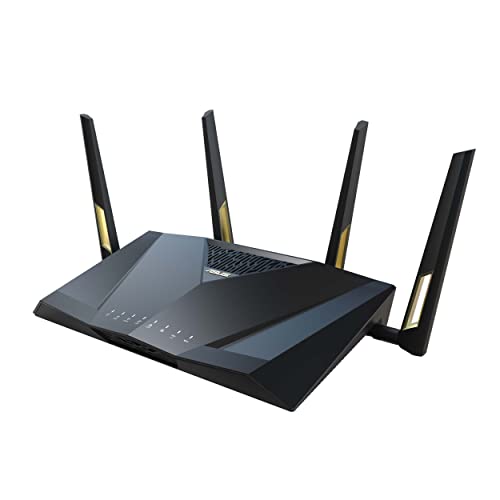
ASUS RT-AX88U Pro
The RT-AX88U Pro suits a small office that runs mainly from one room and wants a single box doing the heavy lifting. Its dual 2.5G ports give wired desks and network storage a faster lane than standard gigabit, while the security suite and virtual private network support cover the remote-access needs of a small team without extra hardware. Adaptive quality of service lets the office prioritise video meetings over background downloads, and the mesh support leaves room to add a node later if the office expands into a second room.
Specs
- WiFi 6 dual-band AX6000, with 1,148 Mbps on the 2.4 GHz band and 4,804 Mbps on the 5 GHz band
- Dual 2.5G ports for wired devices and WAN aggregation
- WPA3 security with AiProtection Pro and lifetime internet security
- Adaptive QoS and port forwarding for traffic management
- AiMesh support for adding mesh nodes later
- 2.0 GHz quad-core CPU
Best for: A one-room office of five to fifteen people that wants strong wired speed and built-in security in a single router.
Watch out for: The router covers one area from a single point, so a long office with thick walls may still need a mesh node to reach the far end.
NETGEAR Nighthawk RAXE500
The RAXE500 fits an office where the 5 GHz band is already crowded and video calls compete with everything else in the building. Its 6 GHz band gives newer laptops and phones a clear lane that older devices cannot use, which keeps meetings smooth even when neighbouring offices saturate the older bands. Twelve streams and a tri-band design let many devices talk at once, and the coverage figure in the listing suits a medium office floor. It is the pick for teams that notice congestion most during peak hours.
Specs
- WiFi 6E tri-band AXE11000 with wireless speed up to 10.8 Gbps
- New 6 GHz band in addition to 2.4 GHz and 5 GHz bands
- 12-stream design for many simultaneous connections
- Coverage up to 3,500 sq. ft. and up to 60 devices
- 1.8 GHz quad-core processor
- 2.5G port for a fast wired connection
Best for: A busy office where the 5 GHz band is congested and newer devices can move onto the clear 6 GHz band.
Watch out for: Only devices with WiFi 6E support can use the 6 GHz band, so older laptops and phones will still share the 2.4 GHz and 5 GHz bands.
ASUS ZenWiFi XT9 (2-Pack)
The ZenWiFi XT9 is the choice when the office spreads across several rooms and a single router leaves dead spots at the far end. The two units form one mesh network, so staff walk between rooms without dropping a call or switching networks by hand. Each unit carries a 2.5G WAN port and three gigabit LAN ports, which keeps wired desks near either node connected at full speed. Lifetime security and parental controls come built in, and the system expands with additional nodes if the office grows.
Specs
- WiFi 6 tri-band AX7800 mesh system, 2-pack
- Coverage up to 5,700 sq. ft. and 6+ rooms
- 2.5G WAN port and 3 gigabit LAN ports per unit
- AiMesh support with lifetime free internet security
- Parental controls for managing connected devices
- 1.7 GHz quad-core processor, 512 MB RAM, 256 MB flash
- 6 internal antennas and USB 3.2 Gen 1 port
Best for: A multi-room office that needs one seamless network across a reception area, meeting rooms, and workspaces.
Watch out for: Mesh units work best with a clear path between them, so placing a node behind thick walls or inside a metal cabinet will weaken the link between units.
Which One Fits Your Situation
One open room with wired desks
Choose the ASUS RT-AX88U Pro. Its dual 2.5G ports serve wired workstations and storage directly, and a single strong router is simpler to manage than a mesh system when everyone sits in one space. Add a mesh node later only if the office expands.
A crowded building with call quality problems
Choose the NETGEAR Nighthawk RAXE500. The 6 GHz band gives WiFi 6E devices a lane that neighbouring networks cannot touch, which is exactly the fix for an office where meetings stutter during peak hours. Check that staff laptops support WiFi 6E first.
Several rooms under one network
Choose the ASUS ZenWiFi XT9 2-pack. Two nodes cover a spread-out office with a single network name, and staff keep their connection while moving between rooms. The wired ports on each node also serve desks far from the main unit.
A growing office that may add space later
Choose the ASUS RT-AX88U Pro or the ASUS ZenWiFi XT9, since both support AiMesh expansion. The RT-AX88U Pro starts as one powerful router, while the XT9 starts as a mesh pair, so pick based on whether the current space is one room or several.
Common Mistakes
- Buying a home router for an office and discovering too late that it cannot separate guest traffic from staff traffic.
- Placing the router in a corner or inside a cabinet, then blaming the hardware for weak coverage at the far end of the office.
- Ignoring the wired port count and ending up with desks, printers, and storage competing for too few Ethernet sockets.
- Choosing a mesh system for a single open room, where one strong router would have been simpler and easier to manage.
- Forgetting that only WiFi 6E devices can use the 6 GHz band, so older hardware gains nothing from a WiFi 6E router on its own.
Frequently Asked Questions
Does a small office need a mesh system or a single router?
A single open room usually works well with one strong router, while an office split across rooms or floors benefits from a mesh system. Mesh units share one network name, so staff stay connected while moving around. If the whole team sits in one space, a single router is simpler to set up and manage.
What does a separate guest network do?
A guest network gives visitors internet access on a separate wireless network that cannot reach staff computers, shared drives, or printers. It keeps the internal network isolated while still offering Wi-Fi to clients and visitors. Business routers add virtual networks that separate staff, guest, and connected equipment traffic even further.
Why do multi-gig ports matter for an office router?
Multi-gig ports carry more data than standard gigabit Ethernet, which helps when the internet plan or an internal file server delivers faster speeds. A 2.5G port suits a fast wired workstation or a network storage device. Offices with only standard internet plans may not notice the difference, but the port keeps the router useful as plans get faster.
Can these routers work with an existing modem?
Yes, each of these routers connects to a modem through its WAN port and takes over the wireless network and routing duties. The modem keeps handling the internet connection itself. Confirm the modem is in bridge mode or that its own Wi-Fi is switched off, so the two devices do not create competing networks.
Related guides
More from Amazon
Programs that pair well with the guide above. Offers and eligibility are set by Amazon and may change.
A free business account with business pricing and bulk-buying tools for work, shop or home office.
Create a business accountFree shipping on eligible items, Prime Video and more. Eligible new members can start with a free trial.
Start a Prime free trialAudiobooks and podcasts to listen to on the go. Eligible new members can start with a free trial.
Try Audible freeAd-free music streaming. Eligible new subscribers can start with a free trial.
Try Music Unlimited freeAs an Amazon Associate we earn from qualifying purchases.