What's inside
- Top 3 Picks
- Quick Comparison
- How We Chose
- 1. Samsung 870 EVO 4TB – Best for High-Capacity Internal Upgrades
- 2. Crucial X9 2TB – Best for Plug-and-Play Portability
- 3. SanDisk 1TB Portable SSD – Best for Budget-Minded Travelers
- 4. SanDisk 2TB Portable SSD – Best for Cheap High-Capacity Portability
- 5. Fikwot FS810 4TB – Best for Budget Bulk Internal Storage
- 6. KEXIN 512GB M.2 NVMe – Best for a Cheap NVMe Boot Drive
- 7. Fikwot FS810 250GB – Best for a Low-Cost OS Drive
- 8. WD_BLACK 1TB SN770 – Best for Gaming
- Related Guides
- Top 3 Picks
- Quick Comparison
- How We Chose
- 1. Samsung 870 EVO 4TB – Best for High-Capacity Internal Upgrades
- 2. Crucial X9 2TB – Best for Plug-and-Play Portability
- 3. SanDisk 1TB Portable SSD – Best for Budget-Minded Travelers
- 4. SanDisk 2TB Portable SSD – Best for Cheap High-Capacity Portability
- 5. Fikwot FS810 4TB – Best for Budget Bulk Internal Storage
- 6. KEXIN 512GB M.2 NVMe – Best for a Cheap NVMe Boot Drive
- 7. Fikwot FS810 250GB – Best for a Low-Cost OS Drive
- 8. WD_BLACK 1TB SN770 – Best for Gaming
- Related Guides
As an Amazon Associate I earn from qualifying purchases. This post may contain affiliate links at no extra cost to you.
The best Black Friday SSD deal for most people this year is the Crucial X9 2TB portable drive. It sits in the mid-range price tier, moves data at up to 1,050 MB/s over USB 3.2, and works with Windows laptops, Macs, tablets and consoles without anyone having to open a case or check a slot type. If you are upgrading the drive inside a desktop or an older laptop instead, the Samsung 870 EVO 4TB is the premium pick, and it suits anyone who wants one enormous, well-proven SATA drive and never wants to think about storage again. Shoppers working with the tightest budget should look at the SanDisk 1TB portable SSD or the KEXIN 512GB M.2 NVMe, both of which land in the budget tier while still delivering a genuine leap over a mechanical hard disk. This roundup compares every drive worth considering this Black Friday by capacity, interface, speed and price per terabyte, and it includes the sizing math that tells you which one your machine can actually accept before you spend anything.
What we cover
- Top 3 Picks
- Quick Comparison
- How We Chose
- 1. Samsung 870 EVO 4TB – Best for High-Capacity Internal Upgrades
- 2. Crucial X9 2TB – Best for Plug-and-Play Portability
- 3. SanDisk 1TB Portable SSD – Best for Budget-Minded Travelers
- 4. SanDisk 2TB Portable SSD – Best for Cheap High-Capacity Portability
- 5. Fikwot FS810 4TB – Best for Budget Bulk Internal Storage
- 6. KEXIN 512GB M.2 NVMe – Best for a Cheap NVMe Boot Drive
- 7. Fikwot FS810 250GB – Best for a Low-Cost OS Drive
- 8. WD_BLACK 1TB SN770 – Best for Gaming
- Related Guides
Our Top Picks


Top 3 Picks
Best Overall: Crucial X9 2TB Portable SSD
The X9 2TB is the pick that fits the widest range of buyers: 2TB of capacity, up to 1,050 MB/s reads over USB 3.2 Gen 2, and a bus-powered USB-C body that needs no enclosure, no adapter card and no screwdriver. It is the drive to buy if you want the storage benefit of an SSD without committing to a specific machine’s internal slot. For laptop users, console owners and anyone who moves big files between two computers, it is the safest mid-range spend of the season.
Best Budget: SanDisk 1TB Portable SSD
At the budget tier, the 1TB SanDisk portable is the cheapest way to get a full terabyte of flash storage you can carry in a pocket. Reads are rated up to 800 MB/s, which is still roughly six to eight times what a mechanical external drive manages, and the price per terabyte at this tier is the lowest in the whole roundup. It is the right choice when the goal is “more storage, spent as little as possible” rather than “fastest possible”.
Best Premium: Samsung 870 EVO 4TB
The 870 EVO in 4TB is the premium internal option: a 2.5-inch SATA III drive with up to 560 MB/s reads, TLC V-NAND, a DRAM cache and a five-year limited warranty with a 2,400 TBW endurance rating on the 4TB model. It suits desktop owners and older-laptop owners who want maximum capacity in a slot that has existed for fifteen years and will keep working in almost anything. It costs more per terabyte than the budget SATA drives, and it is the one most likely to still be in service years from now.
Quick Comparison
| Product | Best for | Key specs | Price tier |
|---|---|---|---|
| Samsung 870 EVO 4TB | Maximum-capacity internal SATA upgrade | 2.5-inch, 7 mm, SATA III 6 Gb/s, up to 560 MB/s read / 530 MB/s write, TLC V-NAND, DRAM cache, 2,400 TBW, 5-year limited warranty | Premium |
| Crucial X9 2TB Portable SSD | Plug-and-play portable storage | USB-C, USB 3.2 Gen 2 (10 Gb/s), up to 1,050 MB/s read, 2TB, bus-powered, no moving parts | Mid-range |
| SanDisk 1TB Portable SSD | Cheapest terabyte of portable flash | USB-C, USB 3.2 Gen 2, up to 800 MB/s read, 1TB, pocket-sized | Budget |
| SanDisk 2TB Portable SSD | Large portable capacity on a budget | USB-C, USB 3.2 Gen 2, up to 800 MB/s read, 2TB, pocket-sized | Mid-range |
| Fikwot FS810 4TB | Bulk internal storage for very little money | 2.5-inch, SATA III 6 Gb/s, up to 560 MB/s, 3D NAND TLC, 4TB | Mid-range |
| KEXIN 512GB M.2 NVMe | Low-cost NVMe boot drive | M.2 2280, PCIe Gen 3.0 x4, up to 3,500 MB/s read / 3,000 MB/s write, 512GB | Budget |
| Fikwot FS810 250GB | Cheapest working OS drive | 2.5-inch, SATA III 6 Gb/s, up to 560 MB/s, 3D NAND TLC, 250GB | Budget |
| WD_BLACK 1TB SN770 | Gaming and fast internal storage | M.2 2280, PCIe Gen 4.0 x4, up to 5,150 MB/s read, 1TB, DRAM-less with HMB, 5-year limited warranty | Mid-range |
| Fikwot FS810 2TB | Cheap 2TB internal SATA | 2.5-inch, SATA III 6 Gb/s, up to 560 MB/s, 3D NAND TLC, 2TB | Budget |
| Apple MacBook Pro 14.2-inch (M4 Pro) | Creators buying storage with the machine | 14.2-inch Liquid Retina XDR, 12-core CPU, 16-core GPU, Apple Intelligence, Thunderbolt, all-day battery, storage configured at purchase | Premium |
| CyberpowerPC Gamer Xtreme VR | Entry-level gaming tower | Intel Core i5-11400F 2.6 GHz, GeForce RTX 3050 8GB, 8GB DDR4, 500GB PCIe NVMe | Premium |
| CyberpowerPC Gamer Master | Prebuilt tower with more memory | AMD Ryzen 5 5600G 3.9 GHz, GeForce RTX 3050 8GB, 16GB DDR4, 500GB NVMe | Premium |
How We Chose
This list was assembled from published manufacturer specifications, interface standards and the practical realities of how people actually use storage — not from lab testing or hands-on measurement. The first filter was category fit: a 2.5-inch SATA drive, an M.2 NVMe stick, a portable USB drive and a complete computer solve different problems, so each product is judged against its own category rather than against the whole list. The second filter was specification honesty. Where a listing states a speed, a capacity or an interface, that number is treated as the ceiling the drive can reach under ideal conditions, and the article explains the realistic ceiling instead. The third filter was upgrade path: a drive is more valuable if it can move into a second machine later, or if it fills a slot that will still exist in five years. The fourth was price tier. Rather than quote a dollar figure that will be stale within a day, each product is placed in a budget, mid-range or premium band so the comparison survives the end of the sale. Endurance ratings, warranty length and cache design were weighted heavily for internal drives, because those are the numbers that determine whether a cheap drive is still cheap in year three.
1. Samsung 870 EVO 4TB – Best for High-Capacity Internal Upgrades
As an Amazon Associate we earn from qualifying purchases at no extra cost to you.

The 870 EVO in 4TB is for the buyer who has decided that one drive should hold everything, and that it should be a drive with a long track record rather than the cheapest flash on the shelf. It suits desktop owners with an open 2.5-inch bay, laptop owners whose machine still accepts a 7 mm SATA drive, and anyone running an older system who wants a single enormous drop-in replacement for a spinning hard disk. If your motherboard predates M.2 slots entirely, this is the top of the SATA food chain, and Black Friday is the season when the 4TB capacity stops feeling like an indulgence.
Key specs
- Form factor: 2.5-inch, 7 mm height
- Interface: SATA III 6 Gb/s, backward compatible with SATA II 3 Gb/s
- Sequential read: up to 560 MB/s
- Sequential write: up to 530 MB/s
- NAND: Samsung V-NAND TLC
- Cache: DRAM
- Endurance: 2,400 TBW on the 4TB model
- Warranty: five-year limited
- Software: Samsung Magician for health monitoring and firmware updates
The strengths here are consistency and predictability. A DRAM cache and TLC NAND mean sustained writes do not fall off a cliff the way they can on DRAM-less, cache-starved designs, so moving a 200 GB folder onto this drive behaves like moving a 200 GB folder, not like watching a progress bar stall at 60 percent. The 2,400 TBW endurance figure is enormous for a consumer drive — at a heavy 100 GB of writes per day, it would take decades to approach. The five-year limited warranty is the longest in this roundup, and Samsung’s Magician software gives you a straightforward health readout, which matters when the drive is holding the only copy of your photo library. Physically, the 7 mm height fits essentially every laptop bay and every 2.5-inch desktop cage, and the drive needs no heatsink, no airflow planning and no BIOS tinkering beyond selecting it as the boot device.
Pros
- 4TB in a single 2.5-inch drive, with no adapter or enclosure needed
- DRAM cache and TLC NAND hold up under sustained writes
- 2,400 TBW endurance rating and a five-year limited warranty
- Works in almost any desktop or laptop made in the last fifteen years
- Runs cool and silent, with no heatsink requirement
- Free health-monitoring and cloning software from the manufacturer
Cons
- Premium price tier — the highest cost per terabyte among the SATA drives here
- Capped by the SATA interface at roughly 560 MB/s, far below any NVMe drive
- Overkill if the machine only stores documents and a browser profile
- Uses a 2.5-inch bay that some modern slim laptops no longer have
Compared with the Fikwot FS810 4TB, the nearest alternative in this list, the 870 EVO asks for more money and returns better sustained-write behaviour, a longer warranty and a much higher endurance rating. The Fikwot drive is the value play: same 4TB, same SATA III interface, same 560 MB/s ceiling, but a budget-to-mid-range price and less published detail about cache design. If the drive is a secondary library for media you could re-download, the Fikwot makes sense. If it is your primary drive, your only drive, or the home of irreplaceable files, the Samsung is the one to stretch for.
2. Crucial X9 2TB – Best for Plug-and-Play Portability

The Crucial X9 2TB is the drive for anyone who does not want to know what an M.2 slot is. It suits laptop users with full internal drives, photographers and editors who shuttle projects between a desktop and a notebook, console owners who want a bigger library, and anyone who has ever wished for a second drive without opening a case. It is also the most sensible pick for a household with mixed hardware — a Windows laptop, a Mac and a tablet — because it needs no drivers and no formatting gymnastics to appear as a normal drive.
Key specs
- Capacity: 2TB
- Interface: USB 3.2 Gen 2 (10 Gb/s) over USB-C
- Sequential read: up to 1,050 MB/s
- Power: bus-powered, no external supply
- Construction: solid-state, no moving parts
- Compatibility: Windows, macOS, iPadOS and Android devices with USB-C
- In the box: USB-C cable, with an adapter for USB-A ports on most retail packages
The headline number, 1,050 MB/s, is close to the practical ceiling of a 10 Gb/s USB link, which is the real reason this drive feels fast: it is not just fast flash, it is fast flash attached to a fast pipe. The catch is that the pipe has to exist at both ends. Plug the X9 into an older USB 3.0 (5 Gb/s) port and it will behave like a roughly 450-500 MB/s drive, which is still quick but not what the box promises. This is the single most common disappointment with portable SSDs, and it is a port problem rather than a drive problem. Beyond speed, the X9’s advantages are boring and valuable: no moving parts means no heads to crash, no spin-up delay, no vibration sensitivity, and no need to eject before nudging a desk. It draws power from the port, so there is no brick to lose. For a 2TB pocket drive at the mid-range tier, that combination is hard to beat, and Black Friday pricing usually pushes it toward the lower half of its band.
Pros
- 2TB in a pocket-sized, bus-powered body
- Up to 1,050 MB/s — near the real-world limit of a 10 Gb/s USB connection
- Works across Windows, macOS, iPadOS and Android without drivers
- No moving parts, so it tolerates being carried around
- USB-C with USB-A adapter support for older machines
- Mid-range price tier rather than premium
Cons
- Delivers full speed only on a USB 3.2 Gen 2 port; older ports halve it
- Costs more per terabyte than an internal SATA drive of the same capacity
- Cannot be used as an internal boot drive in most machines
- Lives outside the case, so it can be lost, borrowed or unplugged mid-write
Against the SanDisk 2TB portable, the nearest alternative here, the Crucial X9 wins on interface headroom: 1,050 MB/s versus 800 MB/s, a gap you will notice when transferring a 50 GB project folder — roughly 50 seconds versus roughly 65 seconds under ideal conditions. The SanDisk typically sits at a slightly lower price point and is the better buy if your machine only has USB 3.2 Gen 1 anyway, because you would never see the X9’s extra speed. If you have a modern USB-C port that supports 10 Gb/s, the X9 is worth the difference.
3. SanDisk 1TB Portable SSD – Best for Budget-Minded Travelers

The 1TB SanDisk portable is the value entry point into flash storage. It suits students, commuters and anyone who needs a terabyte of reliable, pocketable space without paying mid-range money for speed they cannot use. It is also the right first external SSD for someone whose current backup is a USB thumb drive that takes twenty minutes to copy a film. If your laptop’s ports are USB 3.0 or USB 3.2 Gen 1, this drive already exceeds what the port can deliver, which makes the cheaper model the smarter purchase.
Key specs
- Capacity: 1TB
- Interface: USB 3.2 Gen 2 over USB-C
- Sequential read: up to 800 MB/s
- Power: bus-powered
- Format: pocket-sized, solid-state, no moving parts
- Compatibility: Windows and macOS out of the box
What makes this drive worth its place on the list is the price per terabyte. At the budget tier, a 1TB portable SSD is frequently the cheapest way to buy a full terabyte of flash, and it is dramatically cheaper per gigabyte than the same capacity in a premium internal drive. The 800 MB/s read rating is the other half of the story: it is fast enough to edit photos directly from the drive, fast enough to run a virtual machine image without misery, and fast enough that a 20 GB folder moves in well under a minute. It is not fast enough to behave like internal NVMe storage, and it should not be used as a boot volume. Treat it as a very good external library and it will never frustrate you. The usual caveats about portable drives apply: keep it in a bag pocket rather than loose in a laptop sleeve, eject it before unplugging, and do not rely on a single portable drive as your only copy of anything. Two drives in two places beats one drive with a good reputation.
Pros
- Lowest cost per terabyte in this roundup
- Up to 800 MB/s reads — several times faster than a portable hard drive
- Small enough to live permanently in a laptop bag
- Bus-powered over USB-C, with no separate adapter to carry
- No moving parts, so it survives being carried daily
- Simple plug-and-play setup on Windows and macOS
Cons
- 1TB fills quickly if you work with video or large game libraries
- Slower than the Crucial X9’s 1,050 MB/s ceiling
- This is an older model, so stock and pricing can fluctuate during the sale
- Not suitable as an internal or boot drive
Next to the 2TB SanDisk portable, the 1TB version is the same drive with half the capacity and a lower price tier. The decision comes down to one question: how much will you actually store? If your working set is documents, photos and a modest media library, 1TB at the budget tier is the better value and the extra money buys nothing. If you already know you will fill a terabyte within a year — game installs, raw photo archives, video projects — the 2TB model avoids the awkward upgrade where you buy the same drive twice.
4. SanDisk 2TB Portable SSD – Best for Cheap High-Capacity Portability
The 2TB version of the SanDisk portable is aimed at the buyer who needs room rather than records. It suits video editors keeping a project library on hand, photographers with multi-year raw archives, console owners expanding a game collection, and laptop users who simply refuse to manage free space. At the mid-range tier it sits below the Crucial X9 in price while offering double the capacity of the 1TB model, which makes it the capacity-per-pound leader among the portable drives here.
Key specs
- Capacity: 2TB
- Interface: USB 3.2 Gen 2 over USB-C
- Sequential read: up to 800 MB/s
- Power: bus-powered
- Format: pocket-sized, solid-state, no moving parts
- Compatibility: Windows and macOS out of the box
The practical argument for this drive is arithmetic. A 2TB portable at mid-range pricing frequently lands in the same cost-per-terabyte neighbourhood as a 1TB portable at budget pricing, which means doubling your capacity costs little or nothing in efficiency terms. That is unusual, and it is the main reason to choose the larger model even if you do not need 2TB today — storage needs grow, and buying the headroom once is cheaper than buying it twice. Performance is identical to the 1TB version: up to 800 MB/s reads over USB 3.2 Gen 2, which is comfortably beyond the ceiling of a 5 Gb/s USB 3.0 port. If your machine is older, you are paying for speed you cannot reach, and the 1TB budget model becomes the smarter buy. On a modern USB-C machine, though, 800 MB/s is enough to edit 4K footage from the drive in a pinch and to move a 100 GB archive in around two to three minutes rather than the fifteen to twenty minutes a portable hard drive would need.
Pros
- 2TB of portable flash at a mid-range price, not a premium one
- Strong cost-per-terabyte efficiency at this capacity
- Up to 800 MB/s reads, fast enough for direct photo and light video editing
- Pocket-sized and bus-powered over USB-C
- Enough headroom that you are unlikely to fill it within a year
- Works on Windows and macOS without additional software
Cons
- Slower than the Crucial X9 2TB, which reaches up to 1,050 MB/s
- An older model, so availability can tighten late in the sale period
- No hardware encryption or ruggedised rating advertised in the listing name
- External only — it cannot serve as a boot drive
The direct comparison is with the Crucial X9 2TB. Both hold 2TB, both are bus-powered USB-C drives, and both sit in the mid-range tier. The X9 is faster — up to 1,050 MB/s against 800 MB/s — and that difference shows up in large sequential transfers. The SanDisk is typically the cheaper of the two. The tiebreaker is your port: on a 10 Gb/s USB-C connection the X9’s speed advantage is real and worth paying for; on a 5 Gb/s port both drives cap out around 450-500 MB/s and the SanDisk becomes the obvious value pick.
5. Fikwot FS810 4TB – Best for Budget Bulk Internal Storage

The Fikwot FS810 in 4TB is for the buyer who wants the largest possible internal drive for the smallest possible outlay. It suits desktop owners with an empty 2.5-inch bay, home-server and media-library builders, and anyone replacing a 1TB or 2TB mechanical drive in an older machine. It is not aimed at someone who needs benchmark-leading performance; it is aimed at someone who needs four terabytes of quiet, shock-resistant storage inside the case at a mid-range price.
Key specs
- Capacity: 4TB
- Form factor: 2.5-inch
- Interface: SATA III 6 Gb/s
- Sequential read: up to 560 MB/s
- NAND: 3D NAND TLC flash
- Use case: internal storage, secondary library, boot drive on older systems
The case for this drive is straightforward: TLC flash and a 560 MB/s SATA ceiling at a price tier where 4TB used to be unthinkable. TLC matters because it is the more durable of the two mainstream NAND types, and 3D stacking means the cells are built in vertical layers, which is the standard way modern flash achieves high capacity in a small package. In daily use, the difference between this drive and a premium SATA SSD is mostly invisible. Boot times, application launches and file copies all sit within a second or two of each other, because the SATA interface — not the controller — is the bottleneck. Where the gap appears is in sustained writes: large, continuous transfers can slow down on drives with smaller cache buffers, so copying a 300 GB folder may start fast and finish slower. For a media library, a game archive or a backup target, that behaviour is irrelevant. For an operating system on a machine you use eight hours a day, it is worth knowing about.
Pros
- 4TB of TLC flash at a mid-range price tier
- Drops into any standard 2.5-inch bay with no adapter
- Silent, shock-resistant and cool-running compared with a mechanical drive
- Up to 560 MB/s reads — a large jump from spinning disks
- Excellent value for media libraries and secondary storage
- Works in older desktops and laptops with SATA connections
Cons
- Sustained write speeds can drop during very large transfers
- Less published detail on cache design and endurance than premium brands
- Warranty and support terms are shorter and less established than Samsung’s
- SATA speeds only — roughly one-tenth of a Gen 4 NVMe drive
Against the Samsung 870 EVO 4TB, the Fikwot gives up DRAM cache, a longer warranty and a published 2,400 TBW endurance rating in exchange for a meaningfully lower price. The practical question is what the drive holds. A Steam library, a film collection or a folder of project archives that lives on a network share: the Fikwot is the rational purchase, and the money saved buys a second drive for backups. An operating system, a work machine or the only copy of family photos: pay the premium and get the Samsung.
6. KEXIN 512GB M.2 NVMe – Best for a Cheap NVMe Boot Drive
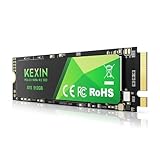
The KEXIN 512GB is for the buyer with an empty M.2 slot and a small budget. It suits anyone reviving an older desktop or laptop that has an M.2 2280 slot but no drive in it, budget builders assembling a first machine, and users who want the responsiveness of NVMe without paying performance-drive prices. It is the cheapest way in this roundup to get a system that boots in seconds rather than a minute.
Key specs
- Capacity: 512GB
- Form factor: M.2 2280
- Interface: PCIe Gen 3.0 x4 NVMe
- Sequential read: up to 3,500 MB/s
- Sequential write: up to 3,000 MB/s
- Use case: operating system and application drive
The numbers tell the story: up to 3,500 MB/s reads is roughly six times what any SATA drive on this list can manage, and it is achieved in a stick the size of a chewing gum wrapper with no cables and no power connector. For an operating system, the benefit is not raw throughput — Windows and macOS do not need 3,500 MB/s — but latency. NVMe drives answer small, scattered requests faster than SATA drives, which is exactly the pattern a boot drive sees. That is why an NVMe system feels snappier even when the sequential numbers are barely relevant. The trade-off is capacity. 512GB is comfortable for an operating system, a browser, office software and a handful of applications, but it fills quickly once you add a game library or a video project folder. Budget NVMe drives also typically skip a DRAM cache and rely on a portion of system memory, which is fine for everyday use and noticeable mainly in heavy sustained writes. If your motherboard has an M.2 slot with a PCIe key, this is the lowest-cost way to make an old machine feel new.
Pros
- Up to 3,500 MB/s reads — far beyond any SATA drive here
- Budget price tier, with no cables or power connectors required
- M.2 2280 fits the most common slot size in desktops and laptops
- Dramatically improves boot and application launch times
- No moving parts and no 2.5-inch bay needed
- Simple installation: one screw, one slot
Cons
- 512GB fills fast if you install large games or edit video
- PCIe Gen 3.0 speeds are well below current Gen 4 drives
- Budget controllers and cache design mean sustained writes slow down
- Requires an M.2 slot that supports PCIe NVMe, not SATA-only M.2
Compared with the WD_BLACK 1TB SN770, the nearest NVMe alternative, the KEXIN is slower and smaller but sits a full tier lower in price. The SN770 reaches up to 5,150 MB/s and doubles the capacity for a mid-range outlay. If you are building a gaming machine or editing video, that gap is worth the money. If you are putting an SSD into a machine that is used for browsing, documents and video calls, the KEXIN delivers the entire subjective benefit — fast boots, instant application launches — at the lowest price on the list.
7. Fikwot FS810 250GB – Best for a Low-Cost OS Drive
The 250GB FS810 is the smallest drive here, and it is honest about what it is for. It suits a very specific buyer: someone with a machine that currently boots from a mechanical hard drive, a very small budget, and modest storage needs. It also suits the second-life market — an old office desktop being repurposed for a child’s schoolwork, a point-of-sale terminal, a light-use family computer. It is not for a gaming rig or a video editing workstation, and treating it as one leads to a frustrating year.
Key specs
- Capacity: 250GB
- Form factor: 2.5-inch
- Interface: SATA III 6 Gb/s
- Sequential read: up to 560 MB/s
- NAND: 3D NAND TLC flash
- Use case: operating system, documents, light applications
Do the arithmetic before you buy. A modern operating system occupies roughly 25-40GB once it has installed updates and a page file. Office software adds several gigabytes. A browser with a working cache adds more. That leaves perhaps 150-180GB of genuinely free space on a 250GB drive, and SSDs slow down noticeably when they are more than about 80 percent full, because the controller needs empty blocks to write into efficiently. In practice, a 250GB drive is a 150GB drive with a safety margin. For documents, spreadsheets, email and a browser, that is plenty — most office workers use less than 100GB. For anything involving games, photos, video or virtual machines, it is not enough, and the correct move is to step up to 1TB or 2TB. Where this drive wins is cost of entry. It is the cheapest way to eliminate the single biggest bottleneck in an old computer, and the transformation from a 5,400 rpm hard drive to any SSD is larger than the transformation from a budget SSD to a premium one.
Pros
- The lowest-cost upgrade that meaningfully speeds up an old computer
- Up to 560 MB/s — the same SATA ceiling as far more expensive drives
- TLC NAND rather than the cheapest QLC alternative
- Standard 2.5-inch form factor that fits almost any bay
- Ideal for repurposed office machines and light-use computers
- Silent, cool and shock-resistant
Cons
- 250GB is small; expect roughly 150GB of usable free space after the OS
- Performance degrades when the drive is nearly full
- Not viable for games, video work or large photo libraries
- You may need to buy again within a year if your needs grow
The obvious step up is the KEXIN 512GB M.2 NVMe, which doubles the capacity and roughly six-times the speed for a modest increase in price. If your machine has a PCIe M.2 slot, the KEXIN is the better buy in almost every case. The FS810 250GB earns its place only when there is no M.2 slot available, when the budget is genuinely at its floor, or when the drive is going into a machine whose only job is email and a browser.
8. WD_BLACK 1TB SN770 – Best for Gaming
![WD_BLACK 1TB SN770 NVMe Internal Gaming SSD Solid State Drive - Gen4 PCIe, M.2 2280, Up to 5,150 MB/s - WDS100T3X0E - [Previous Generation]](https://m.media-amazon.com/images/I/41dOBI0lrHL._SL160_.jpg)
The SN770 1TB is the drive for people who want their machine to feel fast in the ways that matter during a game: quick loads, no texture streaming stutter, and near-instant level transitions. It suits gaming desktops with a free Gen 4 M.2 slot, content creators who move large files regularly, and anyone building a new system who wants a performance drive without stepping into the top price tier.
Key specs
- Capacity: 1TB
- Form factor: M.2 2280
- Interface: PCIe Gen 4.0 x4 NVMe
- Sequential read: up to 5,150 MB/s
- Cache: DRAM-less design using host memory buffer (HMB)
- Warranty: five-year limited
- Use case: gaming, large-file workflows, primary system drive
Gen 4 is where the SN770 separates itself from the budget NVMe drives. Up to 5,150 MB/s is roughly 50 percent faster than a Gen 3 drive’s ceiling and about nine times a SATA drive’s, and it matters most when you are moving big files — a 100 GB game install, a folder of raw footage, a virtual machine image. The DRAM-less design is worth understanding rather than fearing. Instead of a dedicated cache chip on the stick, the drive borrows a small amount of system memory to keep its address map. The upside is a lower price and less heat; the downside is that performance can dip during extremely heavy, sustained random writes, which is a workstation pattern rather than a gaming one. The five-year limited warranty is a genuine advantage at this tier, and the M.2 2280 form factor fits the standard slot on virtually every desktop motherboard and most recent laptops. One practical note: this drive ships without a heatsink, and Gen 4 drives run warmer than SATA drives. In a desktop case with normal airflow that is a non-issue. In a cramped laptop or a small-form-factor build, it is worth checking the clearance and airflow before installation.
Pros
- Up to 5,150 MB/s reads — Gen
Affiliate disclosure. As an Amazon Associate we earn from qualifying purchases at no extra cost to you. Prices accurate as of the date shown.Best Black Friday SSD Deals: Top Drives to…Check price on Amazon
Related guides