We research everything we recommend. When you buy through our links, we may earn a commission. As an Amazon Associate we earn from qualifying purchases.
Best No Drill Laptop Mount For Vehicle
Find the best no drill laptop mount for your vehicle, with seat-bolt mounts that install without drilling, plus fitment, stability, and sizing checks.
As an Amazon Associate I earn from qualifying purchases. This post may contain affiliate links at no extra cost to you.
A laptop in a parked truck or van is only useful if it stays put, sits at a readable height, and leaves both hands free. A no-drill laptop mount for a vehicle does that job by bolting to the hardware your vehicle already has, usually the exposed bolts on the passenger-side seat rail, instead of asking you to drill holes in the floor or the dashboard. The result is a real workstation in the cab that can be removed later without leaving a drilled floor behind, which matters for leased vehicles, fleet trucks, and anyone who wants their resale value intact.
The mounts in this guide are all the same kind of product: a seat-bolt or seat-rail laptop mount that installs with no drilling. They differ in weight, adjustment range, laptop size, and vehicle fit, so match the mount to your vehicle and your laptop first.
No-drill means the mount attaches to existing factory hardware, almost always the bolts that hold the passenger seat rail to the floor. You loosen one or two of those bolts, slide the mount base under them, and tighten the bolts back down. The mount then rises from the floor on a pole or arm and carries a tray that holds the laptop at a workable height beside the driver or in front of the passenger seat.
That method has a hard requirement: the seat rail bolts must be exposed, flat, and reachable. Some vehicles hide the bolts under plastic trim or carpet, some use a hook-style seat mount with no exposed bolt at all, and some have a raised or uneven rail that leaves the base rocking. Check your own passenger seat before ordering.
No-drill does not mean tool-free or instant. Most mounts need a socket or wrench for the seat bolts, and a heavy mount can take the better part of an hour to assemble and fit the first time. What no-drill does guarantee is that nothing is permanently changed: unbolt the base and the vehicle is back to the way it left the factory, with no holes to fill.
What to Check Before You Buy
Fitment comes first, because a mount that does not bolt to your seat rail is useless no matter how good its tray is. Confirm that your vehicle has exposed passenger-side seat rail bolts, and check whether the mount is universal or built for a specific make and model. Universal mounts usually ship with several mounting feet to cover different bolt angles.
Laptop size and weight come second. Check the tray dimensions against your laptop, not just the screen size. A thick rugged laptop can exceed the weight limit even when it fits the tray. Note the difference between parked capacity and moving capacity: a mount rated for 17 pounds parked and 11 pounds moving is telling you that road vibration and braking reduce what it can hold safely while moving.
Adjustability is the third check. Look for height adjustment on the pole, tilt and swivel on the tray, and rotation that lets you swing the screen toward the driver or back toward the passenger. A dual swing arm gives more reach across the cab than a single straight pole, and a quick-release base lets you lift the upper assembly out and restore full passenger legroom in seconds.
Stability is the fourth check, and it is mostly a question of weight and construction. A 13-pound steel mount will shake less on a rough road than a 6-pound aluminum one, and that difference shows up directly in how steady the screen is while you type. The trade-off is real: the heavier mount is harder to carry in and out and takes longer to install.
Cooling and tray grip are the last checks. A ventilated tray lets air move under the laptop on long shifts, and a mount with built-in fans adds active cooling. Tray clips or straps hold the laptop on the tray when the vehicle moves or the cab tilts.
The Best No-Drill Laptop Mounts for Vehicles
Every mount below installs without drilling, bolting to the passenger-side seat rail or seat bolts. All five are the same product type, a vehicle laptop mount with a tray on a pole or arm, and none is a steering-wheel desk, a lap tray, or a dashboard pad.
The RAM Mounts no-drill laptop mount is the heavy-duty pick in this guide, built around a steel mounting base and a dual articulating swing arm that carries the RAM Tough-Tray. It is made for specific Ford trucks: the F-150 from 2015 through 2026 including the Lightning, and the F-250 through F-550 from 2017 through 2026. The base is shaped for those trucks, the seat rail bolts line up, and once it is in, it stays in.
The tray fits laptops from 10 inches to 16 inches wide, and the dual swing arm lets you position the screen where you need it and swing it out of the way when you are done. At 13.2 pounds it is the heaviest mount in this guide by a clear margin, and that weight is the reason it holds its position on rough roads.
The trade-off is that this mount asks for a commitment. It takes longer to assemble than a universal pole mount, it has no height adjustment on the pole, and it is built for one family of trucks, so it does not move to a different vehicle. If your vehicle is not on the fitment list, skip it entirely, because the base will not line up with your seat bolts.
Choose the RAM Mounts no-drill mount if you drive a listed Ford truck and want maximum rigidity from a mount that bolts in once and stays put.
2. VIVO Adjustable Single Laptop Car Mount MOUNT-CAR01
Runner-Up
2. VIVO Adjustable Single Laptop Car Mount MOUNT-CAR01
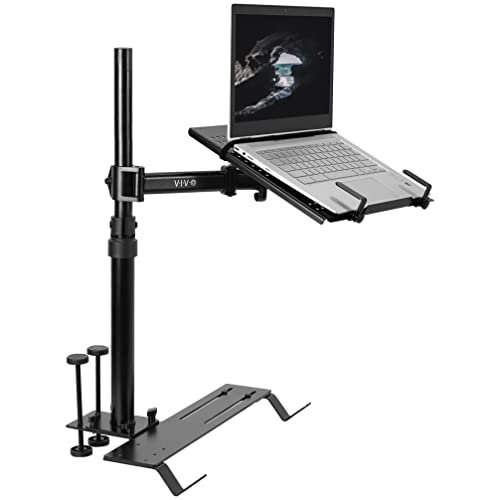
The VIVO MOUNT-CAR01 is the universal pick in this guide, and the safest choice when you are not sure which vehicle the mount will live in. It ships with three different mounting feet designed for the seat bolts commonly found in cars, SUVs, vans, and trucks, so it adapts to bolt angles that would stop a mount with a single fixed foot. The quick-disconnect base lets you lift the pole and tray out and restore the passenger seat for normal use without unbolting the base.
The tray measures 14.2 inches by 11.9 inches and holds laptops, notebooks, and tablets up to 17 inches and 11 pounds. The surface is ventilated, and adjustable tray clips hold the laptop in place. The telescopic pole adjusts from 18.5 inches to 26.3 inches, with 9 inches of bracket adjustment along the pole. Tilt, swivel, and rotation are all adjustable.
At 11 pounds it is a substantial piece of hardware, but still light enough to move between vehicles. The main limitation is the 11-pound capacity, which rules out the heaviest rugged laptops. Check your laptop weight against that limit before ordering.
Choose the VIVO MOUNT-CAR01 if you need one mount for a wide range of vehicles, with full articulation and a quick-disconnect base, and your laptop is within the 11-pound limit.
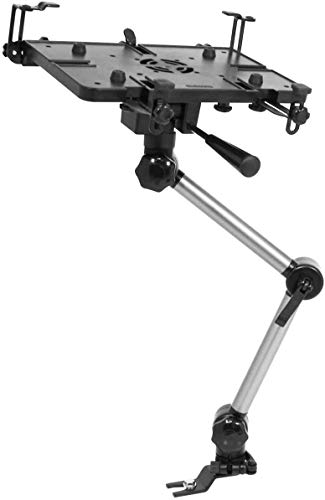
The Mobotron MS-426 is the lightweight pick in this guide, and the mount to buy when portability matters as much as stability. It weighs 5.7 pounds, less than half the weight of the heaviest mount here, yet it holds 17 pounds when parked and 11 pounds while moving. That makes it a good fit for patrol and fleet vehicles and for drivers who move the mount between vehicles.
The mount attaches to the passenger seat rail with no drilling, and the tray adjusts vertically through 180 degrees and horizontally through 360 degrees. A quick-release lever and knob let you pull the upper assembly off the base quickly, which is useful when the passenger seat needs to go back to carrying a passenger.
The MS-426 is a straightforward mount with no cooling fans and no telescoping pole. The main thing to confirm before buying is that your passenger seat rail is flat and the bolt is accessible and visible, because the base needs a flat surface to sit squarely.
Choose the Mobotron MS-426 if you want the lightest no-drill mount that still carries a full-size laptop, or you need a quick-release setup for a fleet or patrol vehicle.
The MELIPRON is the cooling pick in this guide, and the mount to buy when your laptop runs hot through a full shift. Dual USB cooling fans are built into the deck, pushing air across the underside of the laptop while you work. On a summer day in a parked truck with the engine off, that airflow keeps the machine working at full speed instead of slowing down as it heats up.
Beyond the fans, the MELIPRON is a heavy-duty universal mount with a telescopic pole, a 360-degree swivel, and a quick-release design that lets you detach the upper bracket when the mount is not in use. It mounts to the seat rail with no drilling, and the aluminum-and-steel construction is built for technicians, contractors, and fleet drivers. At 12 pounds it is one of the heavier mounts here, which helps stability and hurts portability in equal measure.
The main limitation is that the listing does not state a laptop weight capacity, so judge fit by tray size and by your own laptop rather than by a published number. If it is a heavy rugged laptop, check the tray dimensions and the mount construction carefully before ordering.
Choose the MELIPRON if your laptop runs hot on long shifts and you need a heavy-duty universal mount with built-in cooling fans.
The Mount-It! MI-7410 is the tall-reach pick in this guide, and the mount to buy when the passenger seat is not where you want to work from. Its arm adjusts from 23 inches to 35 inches in height, a taller range than the other mounts here, and the full-motion arm with swivel and tilt joints can reach from the passenger side all the way toward the driver. That reach suits drivers who work from the driver seat while parked and setups where the passenger footwell is already crowded.
The tray is vented, fits laptops from 12 inches to 15.4 inches up to 9 pounds, and uses straps to hold the laptop in place. A quick-release lets you take the upper assembly off when the mount is not needed. The mount bolts to the passenger seat with no drilling, and the listing carries a lifetime warranty.
The 9-pound capacity and the 15.4-inch maximum are the narrowest limits here, so this mount suits mid-size everyday laptops rather than large or rugged machines. Measure your laptop and weigh it before ordering. If it fits, the height range and the reach are genuine advantages.
Choose the Mount-It! MI-7410 if you work from the driver seat while parked and your laptop is a mid-size machine within the 9-pound limit.
Which Pick Fits Your Vehicle and Your Work
The choice starts with your vehicle. If you drive a Ford F-150 or Super Duty from the listed years, the RAM Mounts pick is the most rigid option and the only vehicle-specific mount here. For every other vehicle, the deciding factor is how you work. The VIVO MOUNT-CAR01 is the best all-rounder, with three mounting feet, full articulation, and a quick-disconnect base. The Mobotron MS-426 is the pick for the lightest carry and the highest parked capacity. The MELIPRON is the pick for hot-running laptops and long shifts. The Mount-It! MI-7410 is the pick for tall reach and driver-seat work while parked.
Weight and stability pull in opposite directions across this list. The RAM mount at 13.2 pounds and the MELIPRON at 12 pounds will hold the steadiest screen on rough roads, and they are the hardest to carry in and out. The Mobotron at 5.7 pounds is the easiest to move and the most likely to show vibration on a rough road.
Laptop size narrows the list quickly. The Mount-It! MI-7410 tops out at 15.4 inches and 9 pounds, the VIVO tops out at 17 inches and 11 pounds, the Mobotron holds 17 pounds parked, and the RAM mount covers 10-inch to 16-inch wide laptops. Measure your laptop, weigh it, and cross off any mount whose limits you exceed.
Installation Notes
Start by checking the passenger seat rail bolts on your own vehicle. Remove any plastic trim covering the bolts, confirm the bolts are exposed and the rail is flat, and check that a steel base can sit squarely on the rail. Never force a base onto a rail it does not fit, because a rocking base works loose over time.
Tighten the seat bolts to the vehicle maker’s torque specification. Seat bolts are safety hardware, and they hold the seat in place in a crash. If you do not have a torque wrench or you are not sure of the specification, have the mount fitted by a mechanic.
Check airbag and seatbelt clearance after fitting. The pole and tray must not block the passenger airbag, the seatbelt buckle, or the seat adjustment controls. Sit in the passenger seat and run it through its full range of adjustment to confirm nothing binds.
Common Mistakes
The most common mistake is buying a mount before checking the seat rail. A mount that needs exposed bolts cannot be fitted to a vehicle with hidden or hook-style seat mounts. Look at your own rail first.
The second mistake is ignoring the weight limit. A laptop that exceeds the mount capacity sags, drifts, and stresses the joints. Weigh the laptop before you buy.
The third mistake is choosing a vehicle-specific mount for the wrong vehicle. The RAM mount in this guide fits one family of Ford trucks, and it does not fit other trucks, vans, or sedans.
The fourth mistake is forgetting the passenger. A mount that fills the footwell and blocks the seat makes the passenger seat unusable. A quick-release base solves this, and it is worth choosing a mount that has one if the seat is ever used by a person.
The fifth mistake is using the mount while driving. A laptop on a tray beside the driver is a distraction, and typing while driving is dangerous. These mounts are for parked work and for passenger use while moving.
Safety
Work from a vehicle laptop mount only while parked, with the parking brake set. Never type, read, or adjust the mount while driving. A laptop screen in the driver’s line of sight is a distraction even when it is not being touched, so swing the tray away from the driver before moving.
Secure the laptop with the tray clips or straps every time, because a loose laptop becomes a projectile in a sudden stop. Check the mount bolts and joints regularly, especially in the first weeks after fitting, and tighten anything that has worked loose.
Frequently Asked Questions
Do no-drill laptop mounts really install without drilling?
Yes, when the vehicle has exposed passenger-side seat rail bolts. The mount base bolts to those factory bolts, and nothing is drilled. If your vehicle hides the bolts under trim or uses a hook-style seat mount, check the fitment before buying.
Will a no-drill mount fit any car or truck?
No. Universal mounts fit a wide range of vehicles with exposed seat bolts, and they usually ship with several mounting feet to cover different bolt angles. Vehicle-specific mounts fit only the makes and models on their fitment list.
How much weight can a vehicle laptop mount hold?
It depends on the mount. The mounts in this guide range from 9 pounds to 17 pounds parked, and some list a lower capacity while moving. Weigh your laptop and choose a mount whose limit you are comfortably under.
Can I use a vehicle laptop mount while driving?
No, not as the driver. These mounts are for parked work and for passenger use while the vehicle is moving. Typing or reading a laptop while driving is distracted driving.
Can I remove a no-drill mount and restore the passenger seat?
Yes. Unbolt the base from the seat rail bolts and the vehicle is back to factory condition, with no holes to fill. Mounts with a quick-release base are faster to remove day to day, because the upper assembly lifts off while the base stays bolted in place.
The Bottom Line
The best no drill laptop mount for a vehicle is the one that bolts to your own seat rail, holds your own laptop within its weight limit, and adjusts to a comfortable working position without drilling a single hole. For Ford F-150 and Super Duty trucks on the fitment list, the RAM Mounts no-drill mount is the most rigid choice. For almost any other vehicle, the VIVO MOUNT-CAR01 is the most adaptable universal mount, the Mobotron MS-426 is the lightest, the MELIPRON adds cooling fans for long hot shifts, and the Mount-It! MI-7410 offers the tallest reach for driver-seat work while parked.
Disclosure: As an Amazon Associate, we earn from qualifying purchases.
M
Miller the Driller Editorial Team
We compare specs, warranty terms, long-term owner feedback and street pricing before anything earns a spot. Rankings are never paid.
Affiliate disclosure. As an Amazon Associate we earn from qualifying purchases at no extra cost to you. Prices accurate as of the date shown.
Find the best golf headcovers for woods, driver, fairway wood, and hybrid clubs. Compare knit, nylon, and leather sets that protect clubheads and fit modern woods.
Compare the best Porter-Cable routers for woodworking, from the compact 450 to the 691 D-handle router and the 693LRPK two-base kit, by motor and base.
Compare the best wood spoon sets in teak and sheesham, from 7-piece and 10-piece cooking sets with spatulas and ladles for nonstick pans and daily use.
Compare four tool box sets, from a stackable three-piece tower to steel boxes on wheels, with drawer, latch and capacity checks for home and site work.
Current Windows laptops for photographers chosen by colour-accurate screens, RAM, SSD storage and card readers, with a clear note on Windows 7 support.
Compare four insect repellent sprays for beach days, from picaridin and DEET aerosols to a plant-based pump, with sizes, coverage times and beach-bag fit.

 1. RAM Mounts No-Drill Laptop Mount
 2. VIVO Adjustable Single Laptop Car Mount MOUNT-CAR01
 3. Mobotron MS-426 Standard Vehicle Laptop Mount
 4. MELIPRON No-Drill Truck Laptop Mount
 5. Mount-It! Car Laptop Mount MI-7410