What's inside
- Best XLR Audio Interfaces: The Short Answer
- Top 3 Picks
- Quick Comparison
- How We Chose
- 1. Focusrite Scarlett Solo 3rd Gen – Best for Solo Vocalists on a Budget
- 2. Focusrite Scarlett Solo 4th Gen – Best for One-Mic Podcasters Who Want Current-Gen Features
- 3. Focusrite Scarlett 2i2 4th Gen – Best Overall for Two-Mic Podcasts and Singer-Songwriters
- 4. PIYONE 2X2 Audio Interface – Best for Absolute Beginners
- 5. FIFINE Ampligame SC3 – Best for Streamers Who Mix Mic and Game Audio
- 6. M-AUDIO M-Track Duo – Best Budget Two-Mic Interface
- 7. MAONO P2 Hybrid – Best for Recording to Phone, Tablet, and Computer
- 8. Shure MVX2U Gen 2 – Best for Solo Podcasters With an Existing XLR Mic
- 9. M-AUDIO M-Track Solo – Best for the Lowest-Cost Single-Mic Setup
- 10. Elgato Wave XLR MK.2 – Best for Streamers Who Want Hardware Control and DSP
- 11. M-AUDIO M-Track Duo HD – Best for Two-Mic Studios Wanting a Newer USB-C Revision
- 12. Zoom AMS-22 – Best for Portable Recording and Streaming
- How to Choose
- Frequently Asked Questions
- Which One to Buy, by Situation
- Best XLR Audio Interfaces: The Short Answer
- Top 3 Picks
- Quick Comparison
- How We Chose
- 1. Focusrite Scarlett Solo 3rd Gen – Best for Solo Vocalists on a Budget
- 2. Focusrite Scarlett Solo 4th Gen – Best for One-Mic Podcasters Who Want Current-Gen Features
- 3. Focusrite Scarlett 2i2 4th Gen – Best Overall for Two-Mic Podcasts and Singer-Songwriters
- 4. PIYONE 2X2 Audio Interface – Best for Absolute Beginners
- 5. FIFINE Ampligame SC3 – Best for Streamers Who Mix Mic and Game Audio
- 6. M-AUDIO M-Track Duo – Best Budget Two-Mic Interface
- 7. MAONO P2 Hybrid – Best for Recording to Phone, Tablet, and Computer
- 8. Shure MVX2U Gen 2 – Best for Solo Podcasters With an Existing XLR Mic
- 9. M-AUDIO M-Track Solo – Best for the Lowest-Cost Single-Mic Setup
- 10. Elgato Wave XLR MK.2 – Best for Streamers Who Want Hardware Control and DSP
- 11. M-AUDIO M-Track Duo HD – Best for Two-Mic Studios Wanting a Newer USB-C Revision
- 12. Zoom AMS-22 – Best for Portable Recording and Streaming
- How to Choose
- Frequently Asked Questions
- Which One to Buy, by Situation
As an Amazon Associate I earn from qualifying purchases. This post may contain affiliate links at no extra cost to you.
What we cover
- Best XLR Audio Interfaces: The Short Answer
- Top 3 Picks
- Quick Comparison
- How We Chose
- 1. Focusrite Scarlett Solo 3rd Gen – Best for Solo Vocalists on a Budget
- 2. Focusrite Scarlett Solo 4th Gen – Best for One-Mic Podcasters Who Want Current-Gen Features
- 3. Focusrite Scarlett 2i2 4th Gen – Best Overall for Two-Mic Podcasts and Singer-Songwriters
- 4. PIYONE 2X2 Audio Interface – Best for Absolute Beginners
- 5. FIFINE Ampligame SC3 – Best for Streamers Who Mix Mic and Game Audio
- 6. M-AUDIO M-Track Duo – Best Budget Two-Mic Interface
- 7. MAONO P2 Hybrid – Best for Recording to Phone, Tablet, and Computer
- 8. Shure MVX2U Gen 2 – Best for Solo Podcasters With an Existing XLR Mic
- 9. M-AUDIO M-Track Solo – Best for the Lowest-Cost Single-Mic Setup
- 10. Elgato Wave XLR MK.2 – Best for Streamers Who Want Hardware Control and DSP
- 11. M-AUDIO M-Track Duo HD – Best for Two-Mic Studios Wanting a Newer USB-C Revision
- 12. Zoom AMS-22 – Best for Portable Recording and Streaming
- How to Choose
- Frequently Asked Questions
- Which One to Buy, by Situation
Our Top Picks
 Focusrite Scarlett Solo 3rd Gen USB-C Audio InterfacePack of 11.71 x 5.65 x 3.77 inches0.77 poundsCheck on Amazon
 Focusrite Scarlett Solo 4th Gen USB-C Audio Interface1.79 x 5.63 x 3.78 Inches0.9 PoundsCheck on Amazon
 Focusrite Scarlett 2i2 4th Gen USB-C Audio Interface7.09 x 3.9 x 1.79 inches1.73 poundsCheck on Amazon
 FIFINE Ampligame SC3 Gaming Audio Mixer with Indi-Fader4.44 x 6.45 x 1.6 Inches1.1 poundsCheck on Amazon


Best XLR Audio Interfaces: The Short Answer
The best XLR audio interface for most home studios and solo podcasters is the Focusrite Scarlett 2i2 4th Gen, because it pairs two of the cleanest budget-class preamps on the market with switchable instrument/line inputs, 48V phantom power on both channels, and enough headroom to drive a dynamic broadcast mic without an inline booster. If you only ever plug in one microphone and want the lowest possible spend, the M-AUDIO M-Track Solo is the value pick; if you need per-channel gain control, mix-minus monitoring, or a hardware fader in front of a streaming rig, the Elgato Wave XLR MK.2 or FIFINE Ampligame SC3 cover that ground. The real decision comes down to three trade-offs: how many preamps you need, whether those preamps supply phantom power, and whether the unit has a physical gain knob per channel — not the sample rate printed on the box.
Top 3 Picks
Best Overall: Focusrite Scarlett 2i2 4th Gen
Two combo XLR/TRS inputs, two Scarlett preamps with switchable Air modes, per-channel 48V, and USB-C bus power make this the default answer for a two-mic podcast or a one-mic-plus-guitar setup. It is the interface most people should buy once instead of upgrading through three $80 boxes.
Best Budget: M-AUDIO M-Track Duo
Two combo inputs, one of which handles a guitar or bass directly, plus phantom power and a metal chassis at the lowest realistic price for a genuine two-channel interface. It gives up per-channel phantom switching and premium preamp noise floor, but nothing that stops a two-person podcast from sounding perfectly publishable.
Best Premium / Single-Mic Specialist: Shure MVX2U Gen 2
An XLR-to-USB adapter rather than a box, it turns any dynamic or condenser mic into a USB mic with onboard DSP — auto level, tone shaping, and a limiter — all controlled from software. It suits the solo podcaster who already owns a good XLR mic and wants a clean, fuss-free path into a laptop.
Quick Comparison
| Product | Best For | Key Specs | Price Tier |
|---|---|---|---|
| Focusrite Scarlett Solo 3rd Gen | Solo vocals on a tight budget | 1 XLR mic in + 1 instrument in, 2 out, 24-bit/192kHz, USB-C, 48V, Direct Monitor | Mid-range |
| Focusrite Scarlett Solo 4th Gen | One-mic podcasters who want current-gen preamps | 1 XLR mic in + 1 instrument/line in, 2 out, 24-bit/192kHz, USB-C, 48V, Air/Assist modes | Premium |
| Focusrite Scarlett 2i2 4th Gen | Two-mic podcasts and singer-songwriters | 2 combo XLR/TRS ins, 2 out, 24-bit/192kHz, USB-C, per-channel 48V, Auto Gain, Clip Safe | Premium |
| PIYONE 2X2 Interface | Beginners who want the lowest entry cost | 2 in / 2 out, 24-bit/192kHz, USB-C to PC/Mac/iOS, 48V, compact chassis | Budget |
| FIFINE Ampligame SC3 | Streamers mixing mic plus game audio | XLR mic in, mixer-style fader, volume control, USB output, monitor loopback | Budget |
| M-AUDIO M-Track Duo | Two-person podcasts on a budget | 2 combo ins (1 switchable instrument), 2 out, 24-bit/48kHz per channel, USB-C, shared 48V | Budget |
| MAONO P2 Hybrid | Recording to phone, tablet and computer | Dual XLR ins, USB-C to PC/phone/iPad, instrument input, 24-bit, 48V, onboard monitoring | Mid-range |
| Shure MVX2U Gen 2 | Solo podcaster with an existing XLR mic | Single XLR in, USB-C out, onboard DSP (auto level, tone, limiter), headphone out, up to 60 dB gain class | Premium |
| M-AUDIO M-Track Solo | Absolute lowest-cost single-mic setup | 1 combo in + 1 instrument in, 2 out, 24-bit/48kHz, USB-C, 48V | Budget |
| Elgato Wave XLR MK.2 | Streamers who want hardware control and DSP | 1 XLR in, capacitive mute, gain knob, USB-C, Wave Link software mixing, 48V | Premium |
| M-AUDIO M-Track Duo HD | Two-mic studios that want a newer USB-C revision | 2 combo ins, 2 out, 24-bit/192kHz, USB-C, 48V, metal housing | Mid-range |
| Zoom AMS-22 | Portable recording and streaming | 1 XLR/TRS combo in, 1 instrument in, 2 out, 24-bit/96kHz, USB-C, bus-powered, loopback | Mid-range |
How We Chose
This roundup is built from published manufacturer specifications, category norms, and the practical requirements that show up repeatedly in home-studio questions — not from bench testing, since we do not test, benchmark, or own these units. The filters were straightforward. First, every pick must accept a real XLR microphone and supply 48V phantom power, which rules out USB-only microphone widgets and eliminates anything that cannot run a condenser. Second, the input count had to match a genuine use case: one XLR for solo work, two for interview and co-host formats, and a dedicated instrument path for anyone recording guitar or bass direct. Third, we weighted preamp class and gain range rather than headline sample rates, because a 24-bit/48kHz interface with a clean, high-gain preamp will flatter a dynamic broadcast mic more than a noisy 192kHz box. Fourth, we considered the upgrade path — whether the unit has per-channel gain, direct monitoring, and enough output routing to survive a second mic being added later. Fifth, we kept at least one option in each price tier so the list is useful at every budget, and we avoided units whose only distinguishing claim is a bundled software license.
1. Focusrite Scarlett Solo 3rd Gen – Best for Solo Vocalists on a Budget
As an Amazon Associate we earn from qualifying purchases at no extra cost to you.

The Scarlett Solo 3rd Gen is the interface that a large share of home recorders started on, and it still makes sense in 2026 for one specific person: someone who records one microphone at a time, wants a brand with a long driver-support history, and does not want to pay current-generation prices. It is a one-XLR-input interface, so it is a solo tool by definition — a solo podcast, a voiceover booth, a single-mic singer-songwriter, or a streamer with one mic and a guitar or keyboard on the second input.
Key Specs
- One XLR microphone input plus one instrument/line input on separate connectors
- Two balanced outputs for studio monitors, plus a headphone output
- 24-bit conversion at up to 192kHz sample rate
- USB-C connection, bus powered
- 48V phantom power for condenser microphones
- Direct Monitor switch for zero-latency monitoring of the input
- Gain knob with halo indicator that shows signal level at a glance
Strengths
The appeal here is stability rather than novelty. Focusrite’s third-generation Scarlett line has been in continuous use for years, which means driver maturity, documented troubleshooting, and broad compatibility with every major DAW on Windows and macOS. The single gain knob is large and easy to reach mid-session, and the halo ring turns green when you are in a healthy range, which is a genuinely useful teaching tool for someone learning to set levels. The bus-powered design means one cable to the computer, no wall wart on the desk, and the metal chassis holds up to being carried in a bag.
Pros
- Lowest-cost route into a well-supported, widely documented interface family
- Clean enough preamp for dynamic and condenser mics in spoken-word work
- Zero-latency direct monitoring without software routing
- Bus powered, metal body, compact footprint
Cons
- Only one XLR input — no path to a two-person interview without a second interface or a mixer
- No per-channel phantom switching because there is only one mic channel
- Lacks the newer generation’s auto-gain and clip-safety features
- Instrument and mic inputs share the single gain knob, so hybrid sessions need level compromise
How It Compares
Against the Scarlett Solo 4th Gen, the third generation saves money and gives up convenience features rather than core audio quality — both are one-mic interfaces with 48V and direct monitoring. The real decision point is not Solo 3rd vs Solo 4th; it is Solo vs M-Track Duo. The M-Audio unit adds a second XLR input for roughly the same outlay, so anyone who even suspects they will record a second person should take the extra channel instead of the extra refinement.
2. Focusrite Scarlett Solo 4th Gen – Best for One-Mic Podcasters Who Want Current-Gen Features

The fourth-generation Scarlett Solo keeps the one-XLR-input formula but rebuilds the preamp stage and adds the assist features that make level-setting almost automatic. It suits the solo podcaster, voiceover artist, or solo streamer who records one voice, wants the least possible fiddling before hitting record, and is willing to pay current-generation prices for that convenience and for the longest remaining software-support window.
Key Specs
- One XLR microphone input plus one instrument/line input
- Two outputs, headphone output with independent level control
- 24-bit conversion at up to 192kHz
- USB-C bus power
- 48V phantom power
- Auto Gain — sets a healthy recording level automatically from a short test take
- Clip Safe — monitors the input and trims gain during a take if the signal clips
- Air mode with presence and harmonic options for added top-end detail
Strengths
The two features that justify the upgrade are Auto Gain and Clip Safe. Auto Gain takes the guesswork out of setting levels, which matters more than most people expect: a dynamic broadcast mic on a quiet speaking voice can need most of the available gain, and a beginner who sets it too low ends up with a noisy recording they cannot fix later. Clip Safe acts as an automatic gain rider during the take — if you laugh, cough, or lean into the mic, it pulls the level down rather than letting the take distort. Air mode adds a gentle presence lift that helps a plain-sounding dynamic mic sit closer to a broadcast tone.
Pros
- Automatic level-setting and clip protection remove the two most common beginner mistakes
- Improved preamp stage versus the previous generation
- Independent headphone level control separate from monitor output
- Strong driver support and a long expected service life
Cons
- Still a single XLR input, so it cannot host a two-person recording
- Premium price for a one-channel interface — the money buys features, not input count
- Auto Gain and Clip Safe are convenience tools, not a substitute for good mic technique
- Air mode is a fixed tonal option, not a full EQ
How It Compares
Against the Scarlett 2i2 4th Gen, the Solo 4th costs noticeably less but gives up the second XLR input and per-channel 48V. That is the whole trade: if you record alone and always will, the Solo is the efficient choice; if you might ever record a guest in the same room, the 2i2 is the safer buy because adding a second interface later costs more than the difference. Against the Shure MVX2U Gen 2, the Solo gives you a real monitor output pair and a conventional interface layout, while the Shure gives you a smaller footprint and DSP tuned for voice.
3. Focusrite Scarlett 2i2 4th Gen – Best Overall for Two-Mic Podcasts and Singer-Songwriters

The Scarlett 2i2 4th Gen is the interface most home studios should end up with after they have outgrown a one-channel box. Two combo XLR/TRS inputs mean a two-person podcast works out of the box, phantom power is available per channel so you can run one condenser and one dynamic simultaneously, and the instrument/line switching on both channels covers guitar, bass, and synth. It suits the co-hosted show, the interview format, the singer-songwriter recording voice and guitar at once, and the single-mic user who wants room to grow.
Key Specs
- Two combo XLR/TRS inputs, each switchable between mic, line, and instrument
- Two balanced monitor outputs plus a headphone output
- 24-bit conversion at up to 192kHz
- USB-C bus power
- 48V phantom power, switchable per channel
- Auto Gain and Clip Safe, same as the Solo 4th Gen
- Air mode with presence and harmonic options per channel
- Loopback and routing available through Focusrite’s companion control software
Strengths
Two independent gain knobs with gain halos mean you can set a loud condenser and a quiet dynamic mic on the same session and see both levels at once. Per-channel 48V matters more than people realize: if you run a condenser on channel one and a ribbon or dynamic on channel two, you can leave phantom off for the mic that does not want it. The metal chassis, bus power, and USB-C connector make it a travel-friendly interface, and because it is the volume-selling model in the line, software compatibility and community troubleshooting are the deepest of anything here.
Pros
- Two genuine XLR preamps — the minimum for interview and co-host formats
- Per-channel phantom power and per-channel gain control
- Auto Gain and Clip Safe reduce the risk of an unusable take
- Instrument switching on both channels handles guitar, bass, and synth without a DI box
Cons
- Premium tier price, and the second channel is wasted if you truly record alone
- No onboard DSP effects — all processing happens in the DAW or control software
- Two outputs only, so additional monitor pairs or outboard routing need more gear
- Bus power can be marginal on unpowered USB hubs, especially with phantom power engaged on both channels
How It Compares
Versus the Scarlett Solo 4th Gen, the 2i2 is the correct answer the moment a second person enters the room, and the per-channel controls make it more than simply “a Solo with one more input.” Versus the M-AUDIO M-Track Duo HD, the 2i2 has a higher sample-rate ceiling, per-channel phantom switching, and the assist features, while the M-Track Duo HD undercuts it on price — a reasonable trade if you never clip and are comfortable setting levels by ear. Versus the Elgato Wave XLR MK.2, the 2i2 wins on input count and monitor routing, while the Elgato wins on hardware mute and streaming-oriented mixing.
4. PIYONE 2X2 Audio Interface – Best for Absolute Beginners

The PIYONE 2X2 is the low-cost entry point in this list: two inputs, two outputs, 24-bit/192kHz conversion, and USB-C connectivity across PC, Mac, and iOS devices. It suits the first-time buyer who wants to confirm that home recording is something they will stick with before spending real money, or the secondary setup — a laptop at a second location, a kid’s first recording rig, a spare interface for the rehearsal room.
Key Specs
- Two inputs and two outputs in a compact desktop chassis
- 24-bit conversion at up to 192kHz
- USB-C connection, compatible with PC, Mac, and iOS devices
- 48V phantom power for condenser microphones
- Onboard monitoring for direct listening
Strengths
The point of this class of interface is to get a phantom-power-capable XLR input into a beginner’s hands for as little as possible, and the PIYONE does that with a current-generation connector and a high sample-rate ceiling. For spoken-word recording with a modest dynamic or a budget condenser, the audible difference between this and a mid-range interface is much smaller than the difference made by microphone choice and room treatment. It is also a sensible second interface: keeping one permanently set up at a second desk avoids unplugging your main rig every time you travel.
Pros
- Lowest-cost way to get two inputs and phantom power
- USB-C with multi-platform support including iOS
- Compact enough to live on a small desk or in a laptop bag
- High sample-rate ceiling on paper for the price tier
Cons
- Preamp quality and gain headroom are the expected weak point at this price — quiet dynamic mics may need a booster
- Driver support and long-term firmware updates are less predictable than from established audio brands
- Fewer published specifications makes it hard to compare against brand-name units
- Chassis and switchgear are typically lighter-duty than metal-bodied alternatives
How It Compares
Against the M-AUDIO M-Track Duo, the PIYONE saves money but gives up a known brand’s driver history and a metal housing; if the price gap is small, the M-Track Duo is the safer purchase. Against the M-Track Solo, the PIYONE offers a second input for a similar outlay, which matters if you ever record two microphones. This is the interface to buy when the alternative is not buying one at all.
5. FIFINE Ampligame SC3 – Best for Streamers Who Mix Mic and Game Audio

The FIFINE Ampligame SC3 is not a conventional interface — it is a compact audio mixer with an XLR microphone input, a physical fader, and volume control, aimed at gamers and streamers who need to balance a microphone against computer audio in real time without opening a software mixer mid-stream. It suits the streamer running a dynamic XLR mic who wants tactile control of voice versus game or chat levels.
Key Specs
- XLR microphone input with onboard gain
- Independent fader (Indi-Fader) for hardware level control
- Volume control knob for monitoring and output
- USB connection to computer
- Monitoring output for headphones
- Mixer-style layout rather than DAW-oriented input/output routing
Strengths
The value here is the physical control surface. A hand on a fader to drop game audio while you talk is faster and less error-prone than alt-tabbing to a software mixer, and it is the reason mixer-style streamer boxes exist. The XLR input lets you keep a real microphone rather than a USB mic, so the upgrade path to a better mic stays open. Footprint is small, and setup is closer to plugging in a peripheral than configuring an audio device.
Pros
- Hardware fader and volume control for real-time balancing
- Accepts a proper XLR microphone instead of locking you into USB mics
- Compact and simple — little configuration required
- Low cost for a device with a physical control surface
Cons
- One XLR input only, and not designed for multi-track recording
- Recording-oriented features like per-channel phantom switching and multi-output routing are limited or absent
- Sample rate and preamp specifications are not the selling point at this tier
- Better as a streaming mixer than as a studio recording interface
How It Compares
Against the Elgato Wave XLR MK.2, the FIFINE delivers the same core idea — one XLR mic plus hardware control — for far less money, but with less software depth, fewer DSP options, and no equivalent to Elgato’s streaming-oriented mixer application. Against the M-AUDIO M-Track Solo, the FIFINE trades recording-focus for live-mixing focus: the M-Track Solo is the better choice if the goal is a clean recorded take, and the SC3 is the better choice if the goal is a live stream that sounds balanced.
6. M-AUDIO M-Track Duo – Best Budget Two-Mic Interface

The M-Track Duo is the cheapest credible way to get two XLR-capable inputs with phantom power onto a desk. It suits the two-person podcast, the interviewer who occasionally has a guest, and the singer-songwriter who wants to track a mic and a guitar at the same time without spending Scarlett money.
Key Specs
- Two combo inputs — both accept XLR microphones, one switchable to instrument level
- Two outputs for powered monitors, plus a headphone output
- 24-bit/48kHz recording per channel
- USB-C connection, bus powered
- 48V phantom power
- Metal housing
Strengths
Two mic inputs at a budget price is the entire proposition, and it holds up. The metal body survives desk life better than plastic shells, the combo jacks mean you do not need adapter cables, and the direct monitoring path keeps latency out of the performer’s ears. For spoken-word content — the dominant use case for a two-input budget interface — the practical result is indistinguishable from far more expensive gear once the file is compressed for podcast delivery.
Pros
- Two XLR inputs with phantom power at the lowest realistic price
- Instrument switching on one channel for direct guitar or bass
- Metal chassis and standard combo jacks
- Simple, driver-light setup on Windows and macOS
Cons
- 48V is shared rather than per-channel, so phantom cannot be isolated to one input
- 48kHz ceiling — fine for voice and most music, but below the 96/192kHz headline of pricier units
- Preamp noise floor and gain headroom are the trade-off for the low price, which shows with very quiet dynamic mics
- No auto-gain or clip-protection features
How It Compares
Against the M-Track Duo HD, the original Duo is cheaper and gives up the higher sample-rate ceiling and the newer revision’s conversion; for podcast voice work the audible gap is small. Against the Scarlett 2i2 4th Gen, the Duo saves real money but loses per-channel phantom switching, higher sample rates, and the assist features. Against the M-Track Solo, stepping up to the Duo is the single most cost-effective upgrade in this entire list, because the second XLR input is what makes two-person recording possible at all.
7. MAONO P2 Hybrid – Best for Recording to Phone, Tablet, and Computer

The MAONO P2 Hybrid is built around mobility: dual XLR inputs, USB-C connectivity to PC, phone, and iPad, plus an instrument input for guitar. It suits the creator who records interviews on location with a phone or tablet as the capture device, the mobile podcaster, and the guitarist who wants one box that covers both a mic and a direct guitar feed.
Key Specs
- Dual XLR microphone inputs
- USB-C connection to PC, phone, and iPad
- Instrument input for guitar or bass
- 24-bit conversion at 48kHz class
- 48V phantom power
- Onboard monitoring with headphone output
Strengths
Multi-device recording is the differentiator. Being able to plug into a phone or tablet removes the need for a laptop on location, which changes how portable a two-mic interview setup can be — a bag with two dynamic mics, two stands, and this interface is a complete field kit. Dual XLR inputs mean a two-person conversation can be captured in one pass, and the instrument input keeps a guitar in the same session without extra gear. For the price tier, it covers a wider range of devices than nearly anything else here.
Pros
- Records to phone, tablet, and computer over USB-C
- Two XLR inputs plus an instrument input
- Phantom power for condensers
- Portable field-recording capability without a laptop
Cons
- Preamp quality sits in the mid-range rather than premium class
- Mobile recording depends on the app and device behaving, which varies by phone model
- Fewer outputs and routing options than a desktop-focused interface
- Software ecosystem and long-term update cadence are less established than the major audio brands
How It Compares
Against the Zoom AMS-22, the MAONO offers a second XLR input, while the Zoom offers a more established brand pedigree and a one-in/two-out design aimed at streaming and portable recording. If you need two microphones on location, the MAONO has the advantage; if you need the most dependable single-mic travel interface, the Zoom is the safer pick. Against the M-Track Duo HD, the MAONO wins on device flexibility and loses on brand support and sample-rate ceiling.
8. Shure MVX2U Gen 2 – Best for Solo Podcasters With an Existing XLR Mic
The Shure MVX2U Gen 2 takes a different approach: instead of a desktop interface, it is a compact XLR-to-USB adapter that plugs directly into the back of a microphone and presents itself to the computer as a USB audio device. It suits the solo podcaster, streamer, or remote worker who already owns a good XLR microphone and wants the smallest possible path from mic to laptop, with voice-tuned processing built in.
Key Specs
- Single XLR input, USB-C output
- Onboard DSP including automatic level setting, tone shaping, and a limiter
- Headphone output for direct monitoring
- High-gain preamp class designed to drive low-sensitivity dynamic microphones
- Configuration via Shure’s companion desktop software
Strengths
The gain stage is the headline. Many compact interfaces struggle to drive a low-output dynamic broadcast mic to a healthy level without an inline preamp, and Shure has clearly aimed this product at exactly that problem — it is designed for the SM7B-class microphone user who wants a one-cable solution. The onboard limiter and automatic level control make it unusually forgiving for spoken word: you can set it once and stop worrying about peaks during a long recording. Because it lives on the microphone connector rather than on the desk, it is the most portable option in this list by a wide margin, and it works with a phone or tablet as well as a computer.
Pros
- Strong gain for low-sensitivity dynamic microphones — no inline booster needed
- Onboard auto level, tone shaping, and limiter tuned for voice
- Extremely small and cable-mounted for travel
- Works with computers and mobile devices over USB-C
Cons
- Single XLR input only — no two-mic recording
- No balanced monitor outputs for studio speakers
- Premium price for what is functionally a one-channel preamp
- Software configuration is required to unlock the full feature set
How It Compares
Against the Elgato Wave XLR MK.2, both are single-XLR premium devices, but Shure targets voice recording and microphone gain while Elgato targets streaming with hardware mute and software mixing. Against the Scarlett Solo 4th Gen, the Shure gives up monitor outputs and a conventional desktop form factor in exchange for portability and a stronger gain stage for difficult microphones. If you own a hungry dynamic mic and record alone, the Shure is the more direct solution; if you might add a second input or need speaker outputs, the Solo or 2i2 is the better structure.
9. M-AUDIO M-Track Solo – Best for the Lowest-Cost Single-Mic Setup

The M-Track Solo is the budget counterpart to the M-Track Duo: one combo input that handles a microphone or an instrument, one additional instrument input, two outputs, and phantom power at the lowest price in this roundup. It suits the absolute beginner, the voiceover artist recording one microphone, and anyone building a starter kit where every dollar matters more than flexibility.
Key Specs
- One combo input for XLR microphone or instrument, plus a dedicated instrument input
- Two outputs for powered monitors, plus a headphone output
- 24-bit/48kHz recording
- USB-C connection, bus powered
- 48V phantom power
- Metal housing
- Direct monitoring switch
Strengths
This is the least expensive way to get a real XLR preamp with phantom power and a metal chassis. For a single spoken-word microphone, it does everything required: supplies 48V for a condenser, provides enough gain for most dynamic mics at conversational distance, offers direct monitoring without latency, and connects with USB-C. If the plan is one mic, one speaker, and a podcast feed, nothing here is a limitation in practice.
Pros
- Lowest price in this list for a genuine XLR interface
- Metal body and standard connectors
- Phantom power and direct monitoring included
- Simple, near-zero configuration
Cons
- One XLR input only — no upgrade path to two microphones without replacing it
- 48kHz ceiling
- Modest gain headroom; quiet dynamic mics may need a booster
- No auto-gain or clip protection
How It Compares
Against the M-Track Duo, the Solo saves a small amount and gives up the second XLR input — and that second input is worth far more than the price difference the moment a guest appears. Against the PIYONE 2X2, the M-Track Solo costs more but buys a known brand’s driver support and a metal housing. This is a good interface with one clear caveat: it is a dead end if your format ever grows to two people.
10. Elgato Wave XLR MK.2 – Best for Streamers Who Want Hardware Control and DSP

The Elgato Wave XLR MK.2 is a single-XLR interface designed around live streaming rather than studio recording. It pairs a microphone input with a capacitive mute control, a gain knob, and Elgato’s Wave Link software, which handles multi-source mixing so you can route voice, game audio, chat, and music independently to your stream and your headphones. It suits the streamer or content creator with a good XLR microphone who wants tactile control and a software mixer that understands streaming.
Key Specs
- Single XLR microphone input
- Capacitive touch mute, gain control, and headphone monitoring
- USB-C connection
- 48V phantom power for condenser microphones
- Wave Link software for multi-channel mixing and routing
- Onboard processing options including voice-focused EQ and effects
Strengths
The mute control is the feature streamers actually use: a touch-sensitive top panel that kills the mic instantly is far more reliable than a keyboard shortcut when you need to cough or take a call. Wave Link’s strength is that it treats streaming as the primary use case — separate faders for multiple sources, independent monitor and stream mixes, and the ability to send different balances to your headphones than to your audience. Combined with a good dynamic XLR microphone, this is a complete streaming audio front end.
Pros
- Instant hardware mute with no software interaction
- Software mixer built specifically for multi-source streaming
- Separate monitor and stream mixes
- Runs almost any XLR microphone, including low-sensitivity dynamics
Cons
- Single XLR input — no two-mic recording
- Premium price for one channel
- Optimized for streaming rather than multi-track studio recording
- No balanced monitor outputs for studio speakers
How It Compares
Against the FIFINE Ampligame SC3, the Elgato costs several times more but adds real software mixing, separate monitor and stream mixes, and a better preamp, so the gap is features rather than cosmetics. Against the Shure MVX2U Gen 2, the Elgato wins on streaming workflow and hardware mute while Shure wins on raw gain for difficult microphones and on portability. Against the Scarlett 2i2 4th Gen, the Elgato is the streaming-first pick while the 2i2 is the recording-first pick — the choice depends on whether your output is a live stream or a produced file.
11. M-AUDIO M-Track Duo HD – Best for Two-Mic Studios Wanting a Newer USB-C Revision

The M-Track Duo HD is the updated revision of the two-input M-Track formula, raising the conversion ceiling to 24-bit/192kHz and keeping the metal housing, two combo inputs, and shared 48V. It suits the two-person podcast or small project studio that wants the M-Audio price point with a more current spec sheet, and it is the natural step up for someone who likes the M-Track layout but wants higher sample rates for music work.
Key Specs
- Two combo inputs, at least one switchable to instrument level
- Two outputs for powered monitors, plus a headphone output
- 24-bit conversion at up to 192kHz
- USB-C connection, bus powered
- 48V phantom power
- Metal housing
Strengths
The HD revision answers the most common complaint about the original M-Track Duo — the 48kHz ceiling — which matters if the interface is used for music rather than voice, where higher sample rates give more room when pitching or time-stretching. Otherwise it keeps what worked: two real XLR inputs, a metal body, combo jacks, straightforward drivers, and direct monitoring. For a two-mic podcast that occasionally records instruments, it hits a sensible middle.
Pros
- Two XLR inputs with phantom power at a mid-range price
- 192kHz conversion ceiling — better for music than the base Duo
- Metal chassis and standard connectors
- Instrument switching for direct recording
Cons
- 48V is still shared, not per-channel
- No auto-gain or clip-protection features
- Preamp character is workmanlike rather than a standout at this price
- Output routing is basic — two monitor outs and headphones only
How It Compares
Against the Scarlett 2i2 4th Gen, the M-Track Duo HD costs less and matches the sample-rate ceiling, but gives up per-channel phantom switching, the assist features, and Focusrite’s deeper software support — a fair trade if you set levels confidently. Against the base M-Track Duo, the HD is the better buy for anyone recording music; for pure spoken word, the original is the more economical choice. Against the Zoom AMS-22, the M-Audio offers a second XLR input while the Zoom offers portability and loopback routing.
12. Zoom AMS-22 – Best for Portable Recording and Streaming
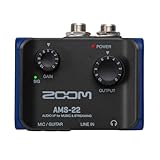
The Zoom AMS-22 is a one-in/two-out USB interface built for people who move between recording and streaming, with a compact bus-powered body, a combo input that takes an XLR mic or a line source, a separate instrument input, and loopback routing for bringing computer audio into a stream. It suits the traveling podcaster, the mobile musician, and the streamer who wants a small, dependable interface from an established audio brand.
Key Specs
- One XLR/TRS combo input plus one instrument input
- Two outputs
- 24-bit conversion at up to 96kHz
- USB-C, bus powered
- Loopback for mixing computer audio into a stream or call
- Direct monitoring with headphone output
- Compact metal-bodied chassis
Strengths
Loopback is the feature that separates the AMS-22 from most one-input interfaces at this price: it lets you send computer audio — backing tracks, call audio, game sound — into your stream or recording without a second device or a virtual audio cable workaround. Zoom’s pedigree in portable recorders shows in the build and the power efficiency; it runs happily from a laptop bus without a power supply. The 96kHz ceiling is above what most voice and streaming work needs and plenty for music tracking.
Pros
- Loopback routing built in for streaming and call recording
- Compact metal body, fully bus powered
- 96kHz conversion ceiling
- Established brand with a long history in portable audio
Cons
- One XLR input only — no two-microphone recording
- No 192kHz ceiling for high-rate music work
- Only two outputs and limited routing beyond loopback
- Mid-range price for a single mic channel
How It Compares
Against the MAONO P2 Hybrid, the Zoom gives up a second XLR input but gains loopback, a stronger brand support record, and a more refined portable build. Against the M-Track Duo HD, the Zoom is the better travel and streaming device while the M-Audio is the better two-mic studio device. Against the Scarlett Solo 4th Gen, the Zoom adds loopback and loses Auto Gain and Clip Safe — pick the Zoom if your work involves computer audio, and the Solo if it does not.
How to Choose
The spec sheet is not where most buying mistakes happen — the mistakes happen because people buy for the format they imagine rather than the format they actually produce. Work through the following in order, and the shortlist collapses to two or three options almost immediately.
Start With Input Count, Because It Is the One Thing You Cannot Add Later
Every other limitation on this list can be worked around; a missing XLR input cannot. If your show is you, alone, recorded in a room by yourself, a single-input interface like the Scarlett Solo 4th Gen, Shure MVX2U Gen 2, Elgato Wave XLR MK.2, Zoom AMS-22, or M-Track Solo is a complete solution. The moment a second human being appears in the same room — a co-host, a guest, a second musician tracking live — you need two XLR inputs, and that means the Scarlett 2i2, the M-Track Duo or Duo HD, the MAONO P2 Hybrid, or the PIYONE 2X2. Buying a single-input box and then adding a second interface later is the most expensive path through this decision, because you pay twice and end up juggling two devices and two clock sources. If there is any realistic chance your format grows to two people within a year, buy the second input now.
Preamp Quality: What Actually Matters and What Does Not
Preamp quality is usually described in terms of noise floor, gain range, and cleanliness at high gain. In practice, the specification that determines whether your recordings sound good is gain headroom — how much clean amplification the preamp can provide before the noise floor becomes audible. This matters enormously with low-sensitivity dynamic microphones, which is exactly what most podcasters use, because a broadcast-style dynamic mic may need 55–60 dB of gain to reach a healthy recording level at conversational distance. A preamp that runs out of clean gain at 50 dB will force you to either speak unnaturally close or accept a hissy recording. This is why the Shure MVX2U Gen 2 exists as a product category, and why the premium Focusrite units and the Elgato Wave XLR MK.2 handle difficult microphones more gracefully than budget boxes. If you use a condenser microphone — which is inherently more sensitive — gain headroom is far less of a constraint, and a budget interface will serve you well. Sample rate, by contrast, is the most overrated specification in this category. Recording spoken word at 48kHz is not a compromise; 48kHz covers the entire audible range with margin, and 96kHz or 192kHz only becomes meaningful for music production involving heavy pitch shifting or time stretching. Do not pay a premium for a higher sample-rate number and then lose it by using a poor microphone.
Phantom Power: Shared Versus Per-Channel
Phantom power is 48 volts sent up the XLR cable to power condenser microphones. Every interface on this list supplies it, but not all supply it independently to each channel. Shared 48V — found on the M-Track Duo and Duo HD, for example — means turning phantom on for one input turns it on for both. In most homes that is harmless: if both microphones are condensers, both want phantom anyway, and a modern dynamic microphone connected to a phantom-powered input is not damaged, because phantom power is applied to pins 2 and 3 in common mode across a balanced connection and a properly wired dynamic mic simply ignores it. The genuine risk case is a vintage ribbon microphone, which can be damaged by phantom power, and a passive ribbon mic used alongside a condenser on a shared-48V interface is the one combination to avoid. If you ever intend to run a ribbon mic, per-channel 48V — as on the Scarlett 2i2 4th Gen — is the correct choice. For everyone else, shared phantom is a non-issue and not worth paying extra to avoid.
Match the Interface to the Output, Not Just the Input
A recorder and a streamer need different things from the same box, and this is where several of these products diverge sharply. If your finished product is an edited file — a podcast episode, a YouTube video with post-production — prioritize clean preamps, a monitor output pair for speakers, low-latency direct monitoring, and a conventional DAW-friendly layout. The Scarlett 2i2 4th Gen, Scarlett Solo 4th Gen, M-Track Duo HD, and Zoom AMS-22 all fit that model. If your finished product is a live stream, prioritize hardware mute, real-time level control, and the ability to route multiple audio sources to different mixes — which is what the Elgato Wave XLR MK.2, FIFINE Ampligame SC3, and, to a lesser extent, the Zoom AMS-22 with its loopback are built for. Buying a studio interface for streaming or a streaming mixer for multi-track recording produces a lot of frustration for no benefit, so decide which output you actually produce before comparing prices.
Budget Tiers and What the Money Buys
At the budget tier — the M-Track Solo, M-Track Duo, PIYONE 2X2, and FIFINE Ampligame SC3 — you get working preamps with phantom power, a bus-powered USB connection, and either one or two inputs depending on the model. What you give up is gain headroom, per-channel phantom control, higher sample rates, and brand-backed long-term driver support. At the mid-range tier — the Scarlett Solo 3rd Gen, M-Track Duo HD, MAONO P2 Hybrid, and Zoom AMS-22 — you get better preamps, higher sample-rate ceilings, more thoughtful monitoring, and features like loopback or multi-device connectivity. At the premium tier — the Scarlett Solo 4th Gen, Scarlett 2i2 4th Gen, Shure MVX2U Gen 2, and Elgato Wave XLR MK.2 — you are paying for convenience and confidence: automatic gain, clip protection, strong gain stages, dedicated software mixing, and long support windows. The practical question is whether those convenience features save you enough time and failed takes to justify the difference, and for anyone recording weekly, they usually do.
Desk Space, Portability, and Physical Controls
Most desktop interfaces here are small enough to sit under a monitor — the Scarlett units and M-Audio units are roughly the footprint of two smartphones side by side, and the Zoom AMS-22 is smaller still. Two categories break that pattern. The Shure MVX2U Gen 2 takes up no desk space at all because it plugs into the microphone itself, which means it travels in the same bag as the mic and the stand; if you record in different locations, this is a meaningful difference. The Elgato Wave XLR MK.2 and FIFINE Ampligame SC3 occupy a middle ground with a top-mounted mute panel or fader, which suits a live operator who needs a hand free for something else. Physical gain knobs matter more than they sound: an interface with a small, recessed gain trim forces you to use software for fine adjustments, while large knobs with level indicators — as on the Focusrite units — let you confirm signal at a glance before you hit record. If you record in a hurry, that matters.
The Upgrade Path Nobody Plans For
The last criterion is where the interface sits in the sequence of purchases you will make over the next two years. An interface with a single XLR input and no monitor output pair is a closed system: you can upgrade your microphone endlessly and the interface will still be the ceiling. An interface with two inputs, a monitor output pair, and per-channel gain gives you room to add a second microphone, powered studio monitors, and an outboard preamp if you ever get serious. Because the interface is the piece you are least likely to replace — the microphone matters more to the sound, and the computer matters more to the workflow — it is worth buying slightly ahead of your current needs. The Scarlett 2i2 4th Gen and M-Track Duo HD are the two picks here that scale furthest for the least money, and the Scarlett’s per-channel phantom switching and assist features are what justify its price over the M-Audio.
Frequently Asked Questions
Do I need an audio interface if I have a USB microphone?
No. A USB microphone contains its own preamp and converter, so an interface would be redundant unless it adds something you need, such as a hardware mute, a second input, or speaker outputs. The reason to move to an interface is almost always that you want to use XLR microphones, which is the format that offers the widest choice and the best upgrade path. If your USB mic already sounds good and you only record one voice, there is no pressing need to change.
Is 24-bit/48kHz enough, or do I need 96kHz or 192kHz?
For podcasting, streaming, and spoken-word recording, 24-bit/48kHz is entirely sufficient — it captures the whole audible spectrum with headroom to spare, and every major platform re-encodes your audio anyway. Higher sample rates are useful mainly for music production where you plan to pitch-shift, time-stretch, or apply heavy processing, since more samples give the algorithm more to work with. 24-bit depth is the part that matters more than the sample rate, because it sets your available dynamic range.
Can I damage a microphone by plugging it into phantom power?
Modern condenser microphones require phantom power and dynamic microphones ignore it, so in normal use there is no risk. The exception is a passive ribbon microphone, which can be damaged by phantom power on unequipped models. If you use a ribbon mic, choose an interface with per-channel 48V so you can enable phantom only on the channel that needs it, and check the microphone’s documentation before connecting it to any interface with phantom power engaged.
Will a budget interface make my podcast sound bad?
Not by itself. The largest factors in recording quality are the microphone, the distance from the microphone, and the room — in that order — and the interface sits well below all three. A budget interface used with a decent dynamic mic in a treated or carpeted room will sound better than a premium interface used with a cheap mic in a bare room. Move to a more expensive interface when you hit a specific limit, such as not enough clean gain or a missing input.
How much gain do I need for a dynamic microphone like a broadcast-style mic?
Low-sensitivity dynamic broadcast microphones often need roughly 55 to 60 dB of clean gain to reach a healthy recording level at a normal speaking distance, which is more than many budget interfaces deliver. That gap is why inline preamps and high-gain adapters like the Shure MVX2U Gen 2 exist. If your recordings sound thin and you have the gain knob near maximum, gain headroom is probably your limiting factor rather than the microphone.
What is direct monitoring and why does it matter?
Direct monitoring routes the input signal straight to your headphones in hardware, bypassing the computer and the recording software entirely. That removes the delay — latency — that would otherwise make it hard to speak or sing in time with what you hear. Most interfaces on this list include it, typically as a switch or knob, and it is one of the features that makes a real interface more pleasant to record with than an improvised setup.
Do I need one XLR input or two?
Buy two if there is any realistic chance you will record a second person in the same room, or if you want to record a microphone and an instrument simultaneously. Buy one only if you are confident you will always record alone with a single microphone, because a single-input interface cannot be expanded — you would need to replace it or add a second device. This is the one specification on the list that cannot be worked around later.
Should I choose an interface or a streaming mixer?
It depends on your output. If you produce an edited file — a podcast episode or a produced video — an interface with clean preamps, monitor outputs, and low-latency monitoring is the right tool. If you produce a live stream where you need to balance voice against game or chat audio in real time, a mixer-style device with a physical fader or mute, such as the Elgato Wave XLR MK.2 or FIFINE Ampligame SC3, will serve you better. Some devices, like the Zoom AMS-22 with its loopback routing, sit in between and handle both reasonably well.
Which One to Buy, by Situation
If you record one microphone and want the most future-proof single-input setup, buy the Focusrite Scarlett Solo 4th Gen — Auto Gain and Clip Safe remove the two mistakes that ruin beginner recordings. If you record alone and want to spend as little as possible, the M-AUDIO M-Track Solo is the cheapest genuine XLR interface here, with the PIYONE 2X2 as the alternative if you want two inputs at a similar price. If you record two people in the same room, the Focusrite Scarlett 2i2 4th Gen is the best overall pick and the M-AUDIO M-Track Duo is the best budget one, with the M-Track Duo HD as the mid-range compromise if you also record music at higher sample rates. If you already own a good dynamic XLR microphone and want the smallest, highest-gain path into a laptop or phone, the Shure MVX2U Gen 2 is the specialist answer. If your output is a live stream and you need hardware mute and multi-source mixing, the Elgato Wave XLR MK.2 is the premium choice and the FIFINE Ampligame SC3 the budget one. And if you record on location with a phone or tablet, the MAONO P2 Hybrid and Zoom AMS-22 are the two that travel best.